1. Introduction into real time weather plugin for Unity

The Real Time Weather Plugin for Unity is an efficient tool to obtain real-time weather data in Unity and process the data to simulate a full environment system.  

We have recently updated the tool with a series of features that will offer an overall improved experience for the users. The new version comes with:
• Expanse – Volumetric Skies, Clouds, and Atmospheres Integration (HDRP)
• Feedback form option for user reviews
• Updated the RealTimeWeatherManager Inspector

Example scenes are provided to show the capabilities of the Unity extension tool with real-time data obtained from three different sources: Weather Atlas official webpage, Weather Underground official webpage, Weather For You official webpage, or Weather APIs like Tomorrow.io, OpenWeatherMap, etc.  

→ Get the Real-Time Weather Plugin for a special price from https://assetstore.unity.com/packages/tools/utilities/real-time-weather-pro-232520

2. Overview & Installation

Import Real-time weather package and follow these steps to get started:

 → Step 1 

On Unity top bar you will find a new tab “Real-time Weather”, so click on it and then select “Real-time Weather Manager”. A new game object will be created in your scene with the “RealTimeWeatherManager” component. 
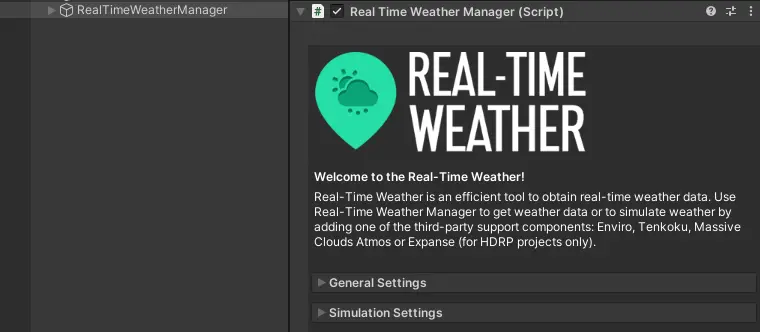
Real Time Weather Plugin ASSIST Software - Main UI

→ Step 2

If you want “Real-time Weather Manager” to not be destroyed when other scene is loaded, then check “Don’t Destroy On Load” in “General Settings” panel.  


→ Step 3

Real Time Weather Plugin ASSIST Software - Don't destroy on load


→ Step 3

In the Location” area fill up the “City” and “Country” input fields for the location you want to receive weather information from. For locations from the USA, check the “United States” option and fill the “State” and “City” fields. 


→ Step 4
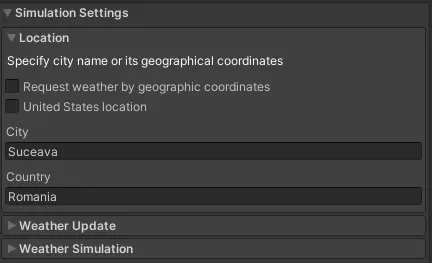
Real Time Weather Plugin ASSIST Software - Simulation Settings


→ Step 4

To get real-time weather updates, check “Enable auto weather update” and also choose “Update frequency” which is measured in minutes. 


→ Step 5
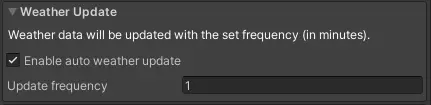
Real Time Weather Plugin ASSIST Software - Update Weather Frequency


→ Step 5

Depending on what weather plugin you have in the project, you can activate Enviro, Tenkoku, Massive Clouds Atmos or Expanse (only for HDRP) Simulation. 
Simply click on one of the weather simulators and everything you need for weather simulation will be added into your scene. 

3. Weather Simulation Assets Integration
3.1 Enviro - Sky and Weather

Enviro - Sky and Weather is a complete dynamic AAA sky and weather solution!  

With Enviro, you can simulate weather, day-night cycle, clouds, vegetation growth and seasons. Easy to set up with wonderful results.  

The current Real-Time Weather version supports integration with Enviro 2.4.2, which can be imported from the Unity Asset Store. 
 

3.2 Tenkoku - Dynamic Sky Integration

Tenkoku- Dynamic Sky brings completely dynamic high-fidelity sky and weather rendering to Unity developers. 

With Tenkoku you can simulate weather, the day-night cycle, and clouds. It's easy to set up with wonderful results.  

The current Real-Time Weather version supports integration with Tenkoku 1.2.2, which can be imported from the Unity Asset Store. 

3.3 MassiveClouds Atmos Integration

Massive Clouds Atmos is an asset that provides the ability to render the entire sky with volumetric effects. It allows you to design the entire sky while adjusting for various weather conditions and time zones in real-time. 

With Massive Clouds Atmos you can simulate a complete day-night cycle, clouds, atmospheric scattering, and fog rendering. 

The current Real-Time Weather version supports integration with Massive Clouds Atmos 1.1.0, which can be imported from the Unity Asset Store

3.4 Expanse – Volumetric Skies, Clouds, and Atmospheres Integration

Expanse – Volumetric Skies, Clouds, and Atmospheres is a state-of-the-art volumetrics tool for HDRP that gives you the power to author beautiful skies, clouds, and fog banks. Together, with Real-Time Weather Manager, you can create compelling and interactive atmospheres. 

With Expanse you can simulate a complete day-night cycle, cloud coverage, atmospheric scattering, fog density, plus other excellent effects. 

The current Real-Time Weather version supports integration with Expanse – Volumetric Skies, Clouds, and Atmospheres 1.6.8, which can be imported from the Unity Asset Store

More information about weather simulation tools activation & deactivation procedures could be found at pages 6-10 on the Documentation. 

4. Help& BugReport

This module will send an email to the Real-Time Weather developers when an error appears in the services used for getting weather data. It can also be used to ask other questions.  

The Bug Reporter will be activated automatically when all the weather providers will fail to obtain weather data.  

It can also be activated by pressing the “Real-time Weather Manager” tab and then selecting “Bug Reporter”. 

5. Feedback Form

This dialog can be opened from the toolbar “Real-Time Manager” -> “Help” -> “Feedback Form”. 

The module is used to send your feedback to the Real-Time Weather developers. 
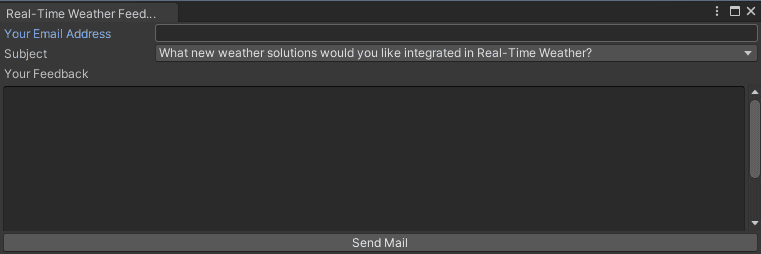
Real Time Weather Plugin ASSIST Software - Feedback Form
6. ScriptingAPI
6.1 Real-TimeWeatherManager

The RealTimeWeatherManager class is implemented using the Singleton design pattern and it manages the main functionalities of the Real-Time Weather plugin. It allows weather data requests from the Atlas module, Underground module, and WeatherForYou module.  

Also, it manages the automatic weather data update and weather simulation using third-party support components: Enviro, Tenkoku and Massive Clouds Atmos or Expanse.

6.2 Request weather data

public void RequestWeather(string city, string country) 
Example:  
RealTimeWeatherManager.instance.RequestWeather("Paris", "France");

The Weather data request can be made using the following function:  

6.3 Receive weather data

public delegate void WeatherUpdate(WeatherData weatherData); 
public event WeatherUpdate OnWeatherUpdate; 
 
Example:  
RealTimeWeatherManager.instance.OnWeatherUpdate += OnWeatherUpdate;

Receiving current weather data can be done by subscribing to the OnWeatherUpdate event. 

6.4 Notify weather data changed

Send a notification with updated weather data to the components that listen to the OnWeatherUpdate event. 


private void NotifyWeatherChanged(WeatherData weatherData); 
7. Weather Data

The WeatherData class is used to store and manage weather data. 

_localization is a Localization class instance that holds the localization data: city, country, latitude, and longitude. 

_dateTime is an instance of DateTime structure that represents an instant in time, typically expressed as a date and time of day. 

_utcOffset is an instance of TimeSpan structure that represents the difference in hours and minutes from Coordinated Universal Time (UTC) for a particular place and date. 

_wind is a Wind class instance that holds the wind data: direction and speed. Speed is measured in km/h. 

_weatherState a WeatherState enum value that represents the weather state. 


public enum WeatherState
{
Clear, 
PartlyClear,
Cloudy,
PartlyCloudy,
Mist,
Thunderstorms,
RainSnowPrecipitation,
RainPrecipitation,
SnowPrecipitation,
Windy,
PartlySunny,
Sunny,
Fair	
}

_temperature is a float value that represents the temperature in °C. 

_pressure(atmospheric pressure), also known as barometric pressure is a float value that represents the pressure within the atmosphere of Earth measured in millibars. 

_humidity a float value that represents the humidity. 

_precipitation is a float value that represents the precipitation in mm. 

_dewpoint is the temperature to which air must be cooled to become saturated with water vapor at °C. 

_visibility is a float value that represents the visibility in km. 

_indexUV is a float value that represents the UV index. The ultraviolet index is an international standard measurement of the strength of sunburn-producing ultraviolet (UV) radiation at a particular place and time. 

The weather data received from the services can be viewed in the WeatherUI interface. 
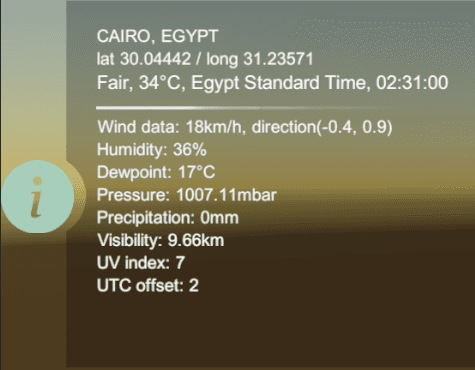
Real Time Weather Plugin ASSIST Software - Info UI

The WeaterUI Prefab can be found in Real-Time Weather Manager/Prefabs/UI Prefabs. The information will be displayed if simulation settings have been set. 

8. Atlas Module

This module is responsible for downloading web pages from https://www.weather-atlas.com and parsing them to obtain weather information. 

The webpage data is requested using input composed from the non-abbreviated, complete name of the city and country, for example: "Spain/Madrid”. 

The obtained data are parsed through HtmlAgilityPack HTML parser, a C# linked solution that transforms a plain text in a parsable HTML node structure using tags division. 

8.1 Receive Atlas weather data

public delegate void OnWebPageParsed(WeatherData weatherData); 
public OnWebPageParsed onWebPageParsed;

Example:
_atlasModule.onWebPageParsed += OnReceivingAtlasWeatherData;

Text BoxReceiving Atlas weather data can be done by subscribing to the OnWebPageParsed delegate. 
 

8.2 Receive Atlas exception

public delegate void OnExceptionRaised(ExceptionType exception, string message);
public OnExceptionRaised onExceptionRaised;

Example:
_atlasModule.onExceptionRaised += OnAtlasServiceExceptionRaised;

Receiving Atlas exception can be done by subscribing to the OnExceptionRaised delegate. 

The WeatherAtlasModule is instantiated in the scene as a child of RealTimeWeatherManager. You can use this module separately, the WeatherAtlasModulePrefab prefab can be found in Real-Time Weather/Prefabs/Weather Modules Prefabs.
 

9. Weather for your module

This module is responsible for downloading web pages from https://www.weatherforyou.com/ and parsing them to obtain weather information. 

The webpage data is requested using input data composed from the name of the city/county and the abbreviated name of the country, for example: “&place=liverpool&state=&country=gb”. 

The obtained data are parsed through HtmlAgilityPack HTML parser, C# linked solution which transforms a plain text in a parsable HTML node structure using tags division. 

9.1 Receive WeatherForYou weather data

public delegate void OnWebPageParsed(WeatherData weatherData);
public OnWebPageParsed onWebPageParsed;

Example:
_weatherForYou.onWebPageParsed += OnReceivingWeatherForYouData;

Receiving WeatherForYou weather data can be done by subscribing to the OnWebPageParsed delegate. 

9.2 Receive WeatherForYou exception

public delegate void OnExceptionRaised(ExceptionType exception, string message);
public OnExceptionRaised onExceptionRaised;

Example:
_weatherForYou.onExceptionRaised += OnWeatherForYouExceptionRaised;

Receiving WeatherForYou exception can be done by subscribing to the OnExceptionRaised delegate. 

The WeatherForYouModule is instantiated in the scene as a child of RealTimeWeatherManager. You can use this module separately, the prefab can be found in Real-Time Weather/Prefabs/Weather Modules Prefabs.
 

10. WeatherUndergroundModule

This module is responsible for downloading web pages from https://www.wunderground.com/ and parsing them to obtain weather information.  

The webpage data is requested using input data composed from the abbreviated name of the country and the name of city/county, for example: “fr/Paris”. 

The obtained data are parsed through HtmlAgilityPack HTML parser, C# linked solution that transforms a plain text in a parsable HTML node structure using tags division.  

10.1 Receive Underground weather data

public delegate void OnWebPageParsed(WeatherData weatherData); 
public OnWebPageParsed onWebPageParsed; 
 
Example: 
_undergroundModule.onWebPageParsed += OnReceivingUndergroundData;

Receiving Underground weather data can be done by subscribing to the OnWebPageParsed delegate. 

10.2 Receive Underground exception

public delegate void OnExceptionRaised(ExceptionType exception, string message);
public OnExceptionRaised onExceptionRaised;

Example:
_undergroundModule.onExceptionRaised += OnUndergroundExceptionRaised;

Receiving Underground exception can be done by subscribing to the OnExceptionRaised delegate. 

The WeatherUndergroundModule is instantiated in the scene as a child of RealTimeWeatherManager. You can use this module separately, the WeatherUndergroundModulePrefab prefab can be found in Real-Time Weather/Prefabs/Weather Modules Prefabs.

11. Open Weather Map API

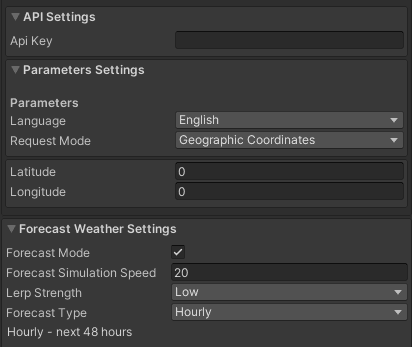
OpenWeatherMap is one of the services that offers the capabilities to obtain real-time weather data using HTTP requests to their data-server, based on a user account. In our application we created all the necessary functionality for requesting weather data for two important requests from the server: [Current Weather Data API] and [One Call API]. 

Through the One Call API request, the user could obtain forecast weather data for the next following 48 hours with a step at every hour, or the next 7 days with a daily forecast. 
Real Time Weather Plugin ASSIST Software - Open Weather Map API

The request is composed of: API key, localization data, and optional parameters, using the following request: 

=> api.openweathermap.org/data/2.5/weather?q={city name}&appid={API key} 
 

11.1 OpenWeatherMap request methods

There are 4 modes of request: 

  • City name, state code (applicable only ofr US), and country code 
  • CIty ID [cities.json - file available on the OpenWeatherMap page] 
  • Latitude & Longitude 
  • Zip code and country code 
     
11.2 OpenWeatherMap Parameters

There are 2 types of parameters: 

  • Language: en, fr, de, jp, ro, etc. 
  • “Request mode” that represents the 4 types of requests presented. 
12. Tomorrow.io API

Tomorrow.io is the world’s leading All-in-One Weather Intelligence PlatformTM [Link], which offers the opportunity to obtain real-time weather data or forecast data (hourly – up to 108 hours, or daily - up to 14 days). 

The Tomorrow API is organized in a RESTful, stable endpoint structure, administered over HTTPS response codes and authentication. The API has predictable URLs, request query and body parameters, and JSON-encoded responses. 

Access to the Tomorrow API requires a valid access key with the right permissions. 
Real Time Weather Plugin ASSIST Software - Tomorrow.io API
12.1 Tomorrow.io request methods

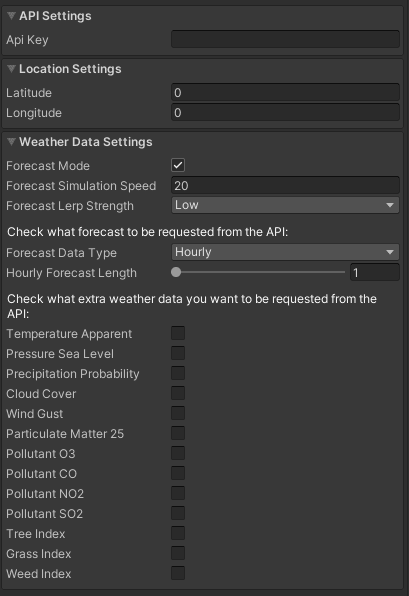
To request weather data from Tomorrow, you must make the following settings in the Tomorrow Module inspector: 

  • Specify a valid API key in the Tomorrow API key field. Requests not properly authenticated will return a 403-error code; 
  • Specify latitude and longitude (ISO 6709). 
12.2 Tomorrow.io parameters

The Tomorrow API will automatically request the core weather data such as temperature, wind speed and direction, and so on. In the "Weather Data Settings" menu, check what forecast information and what additional information you want to request from the API. You can choose from a set of weather parameters related to forecast, air quality, and pollen. 

More information about data structures used, the integration with Real-Time Manager, or functionality for user modules could be found at pages 23-26, for Open Weather Map, and pages 29-34, for Tomorrow.io, in the Documentation. 

Congrats to our Game Development team for the creativity, dedication, and hard work that went into creating the Real-Time Weather Plugin.

→ Get the Real-Time Weather Plugin for a special price from the Unity Asset Store

ASSIST Software’s dedicated game development team also created a demo scene for testing purposes meant to provide a better understanding of the product.

Share on:

I have read and understood the ASSIST Software website's Terms of Use and Privacy Policy.

Want to stay on top of everything?

Get updates on industry developments and the software solutions we can now create for a smooth digital transformation.

Frequently Asked Questions

1. Can you integrate AI into an existing software product?

Absolutely. Our team can assess your current system and recommend how artificial intelligence features, such as automation, recommendation engines, or predictive analytics, can be integrated effectively. Whether it's enhancing user experience or streamlining operations, we ensure AI is added where it delivers real value without disrupting your core functionality.

2. What types of AI projects has ASSIST Software delivered?

We’ve developed AI solutions across industries, from natural language processing in customer support platforms to computer vision in manufacturing and agriculture. Our expertise spans recommendation systems, intelligent automation, predictive analytics, and custom machine learning models tailored to specific business needs.

3. What is ASSIST Software's development process?  

The Software Development Life Cycle (SDLC) we employ defines the stages for a software project. Our SDLC phases include planning, requirement gathering, product design, development, testing, deployment, and maintenance.

4. What software development methodology does ASSIST Software use?  

ASSIST Software primarily leverages Agile principles for flexibility and adaptability. This means we break down projects into smaller, manageable sprints, allowing continuous feedback and iteration throughout the development cycle. We also incorporate elements from other methodologies to increase efficiency as needed. For example, we use Scrum for project roles and collaboration, and Kanban boards to see workflow and manage tasks. As per the Waterfall approach, we emphasize precise planning and documentation during the initial stages.

5. I'm considering a custom application. Should I focus on a desktop, mobile or web app?  

We can offer software consultancy services to determine the type of software you need based on your specific requirements. Please explore what type of app development would suit your custom build product.   

  • A web application runs on a web browser and is accessible from any device with an internet connection. (e.g., online store, social media platform)   
  • Mobile app developers design applications mainly for smartphones and tablets, such as games and productivity tools. However, they can be extended to other devices, such as smartwatches.    
  • Desktop applications are installed directly on a computer (e.g., photo editing software, word processors).   
  • Enterprise software manages complex business functions within an organization (e.g., Customer Relationship Management (CRM), Enterprise Resource Planning (ERP)).

6. My software product is complex. Are you familiar with the Scaled Agile methodology?

We have been in the software engineering industry for 30 years. During this time, we have worked on bespoke software that needed creative thinking, innovation, and customized solutions. 

Scaled Agile refers to frameworks and practices that help large organizations adopt Agile methodologies. Traditional Agile is designed for small, self-organizing teams. Scaled Agile addresses the challenges of implementing Agile across multiple teams working on complex projects.  

SAFe provides a structured approach for aligning teams, coordinating work, and delivering value at scale. It focuses on collaboration, communication, and continuous delivery for optimal custom software development services. 

7. How do I choose the best collaboration model with ASSIST Software?  

We offer flexible models. Think about your project and see which model would be right for you.   

  • Dedicated Team: Ideal for complex, long-term projects requiring high continuity and collaboration.   
  • Team Augmentation: Perfect for short-term projects or existing teams needing additional expertise.   
  • Project-Based Model: Best for well-defined projects with clear deliverables and a fixed budget.   

Contact us to discuss the advantages and disadvantages of each model. 

1. Is ASSIST Software a reliable company for custom engineering?

Absolutely. Our partners have given us great recommendations and reviews, leading us to win The Manifest Award for Most Reviewed Software Developers. Further proof comes from our 97% employee retention rate and ongoing client partnerships for over 8 years.  

2. Are the ASSIST Software Romanian software engineers certified?

Yes. 85% of our software programmers are certified.  

At a company level, ASSIST Software is certified and recognized by industry players such as Microsoft, AWS, Google Cloud, Adobe, Drupal, Fujitsu, ISTQB, and others.  

Our employee certifications are tremendously important as they reflect the shared commitment to long-term growth.

3. Why should I choose Romania for custom software development? 

Romania has become a significant player in custom software development, attracting businesses worldwide. Romania boasts the highest number of certified IT specialists in Europe and ranks sixth globally, surpassing even the US in tech specialists per capita.  

At ASSIST Software, what sets us apart is our team and our location: our engineers are certified, experienced, and flexible, while being in the +2 GMT time zone allows us to easily facilitate meetings with clients all over the world.

4. What team will work on my project, and where will it be located?

ASSIST Software's headquarters is in Romania, a prime country for software development outsourcing. Our 350+ software engineers speak English and have a deep passion for innovation.  

We provide regular project updates through reports, meetings, and online dashboards. Generally, you'll have access to a dedicated project manager who will be your point of contact for any questions or concerns.  

5. How much will my project cost me?

Our prices are competitive, and as per our working model, we guarantee you will be satisfied with the result. Frequent meetings, check-ins, and a great communication structure will ensure this outcome.   

Project costs depend on various factors, including complexity, scope, required technologies, and team size. We'll gather detailed information about your project during the initial consultation to provide a customized quote and we guarantee that you will be able to see the benefits of bespoke software.  

1. What technologies do you work with?

ASSIST Software tackles your projects with a robust tech stack. We build native and cross-platform mobile apps, craft user-friendly web experiences, and create stunning visuals. 

Our wide-ranging expertise starts from Java, Python, and JavaScript frameworks to cutting-edge solutions like AR/VR, blockchain, and AI/ML. We also manage databases, leverage cloud platforms, and ensure flawless project execution. We're your one-stop shop for exceptional software development from concept to deployment. You can view our expertise for more details.   

2. Are you experienced in AI/ML development?

Yes. We have extensive experience in data engineering and machine learning operations (MLOps). We can employ neural networks, computer vision, and AI models to benefit your ideas.   

You can trust our long-term experience with big data, NLP, and sentiment analysis, as over the past three years, we led a European security project with 15 partners focused on detecting radicalization on social media and the dark web.

3. Do you have a research and development department and work on European Projects?

We know R&D is crucial for businesses to stay competitive and thrive in dynamic markets. Successful R&D efforts lead to developing exceptional products or services, improved efficiency and effectiveness in operations, and enhanced market positioning.   

We have established solid partnerships with 160+ European research companies, universities, and research centers (e.g., Fraunhofer, TWI, University of Heidelberg, REWE Group, SINTEF, etc.) and have participated as technical partners in over 25 EU-funded projects.  

4. Besides custom software solutions, what other services do you offer?

  • Design Thinking for Breakthrough Products:  

    We craft user experiences that resonate. Our design process is an immersive collaboration, starting with workshops to uncover your vision and user needs. We conduct market research, analyze the competition, and guide you toward cutting-edge solutions in accordance with your business requirements.  

  • Digital Transformation to Reimagine Your Business:

    Digital transformation is nothing less than a strategic shift. We empower you to become more agile and data-driven, optimizing core processes for the digital age.  

  • Scale with Confidence as We Build for Growth:  

    We understand that business success and development mean new challenges. Our solutions are built to scale seamlessly, accommodating increasing user bases and data volumes without sacrificing performance or security.  

5. As a company, does ASSIST have its own software products?

Yes, ASSIST Software teams have been involved in designing and developing innovative products that address community needs. One such example is the web and mobile platform Autisma. This therapy assistant enables continued learning for children diagnosed with autism spectrum disorder.   

Our extensive knowledge of the Unity and Unreal engines has allowed us to develop two mobile games, Elly and the Ruby Atlas and Hooman Invaders, as well as various Unity Assets, such as the Real-Time Weather PRO and Easy Sky. These two Unity assets allow Unity developers to control the weather and sky in their projects.   

1. Is ASSIST Software hiring right now?

We are always looking for great people to join our team, whether you're a senior software engineer or a new talent seeking an IT career. Please check our careers page and contact us. Our HR department will contact you as soon as possible.   

2. Is ASSIST Software organizing internships?

Yes. Each year, we organize individual and group internships for students. Our long-term partnership with the Stefan cel Mare University of Suceava allows us to put together great events for students and help them get started in the industry. 

3. What type of learning culture does ASSIST Software encourage?

Our focus on innovation comes from a 'can do' attitude and the continuous learning we encourage our colleagues to pursue. We frequently organize workshops, learning sessions, presentations, and masterclasses. All these events are free and open to our colleagues and aim to support their professional and personal development. 

4. How does ASSIST Software focus on teamwork?

The key to stellar teamwork is the quality time we spend together. ASSIST employees and their families are frequently invited to participate in all activities. We encourage a healthy lifestyle by promoting and organizing hikes, bike riding sessions, marathons, volleyball, football and tennis matches, ping-pong championships, and many more.   

We show our care for the environment through reforestation campaigns and forest cleaning activities.   

We also have an English-speaking club, e-sports gaming nights, tech discussions, networking parties, and board game sessions.   

5. How does ASSIST Software give back to the community?

Volunteering and charity are essential to us, which is why we founded the ASSIST Humanitarian Foundation. We genuinely care about our community and want to improve the future. We invest in IT equipment for schools and award excellent teachers. We also help hospitals and fire departments enter the 21st century.   

We sponsor cultural events and deliver humanitarian aid to those in need. If you agree with our views, you can also donate.   

ASSIST Software Team Members