Everything seems to run smoothly in the world of mobile testing enthusiasts: we show up at the office, hop into a few meetings, glance at the backlog, and roll up our sleeves to start testing. We go through a story or two, switch between devices, and chase edge cases that vanish when we try to reproduce them. It gets the job done, but sometimes we need to pause and wonder: Are we really as efficient as we could be? Are we doing our best work or just ticking boxes?


Efficiency, at its core, means getting results without wasting resources, and in this case, my dear QA folks, we are the most valuable resources. When tasks start to feel like déjà vu, it’s usually a sign they’re ripe for automation. We need mobile automation for speed, consistency, and to stay sane in the long run.


Now that mobile apps are everywhere and users expect lightning-fast performance, testing needs to keep up. 
If an app loads slowly, crashes, or doesn’t offer a smooth experience, users won’t think twice before uninstalling it. In fact, according to Appsflyer, over half of all installed apps go uninstalled within the first 30 days. That’s a clear sign that users have little patience for apps that don’t meet expectations when they have so many alternatives, just a tap away.
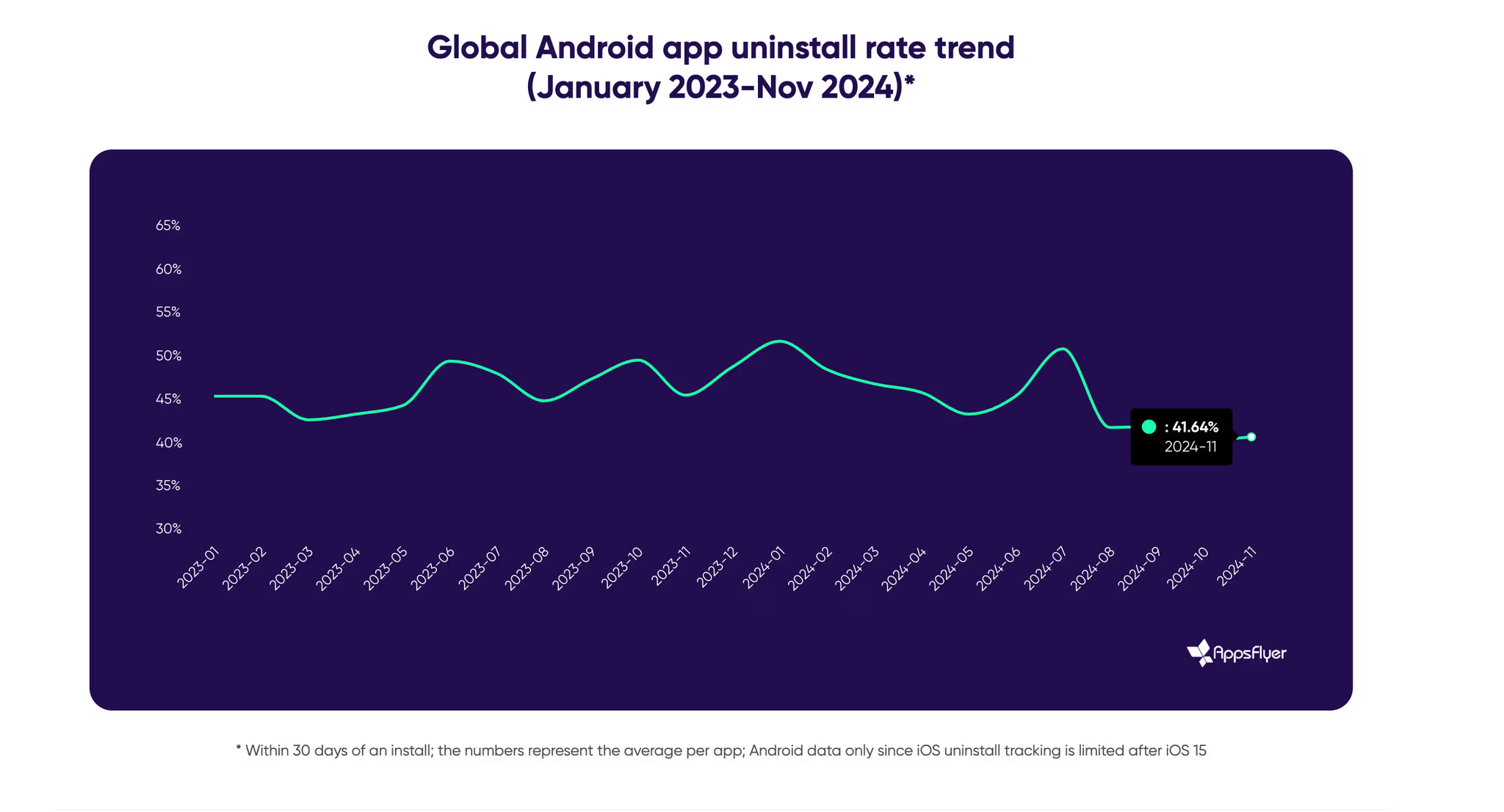
Google_Android_App_Uninstall_Rate

This is exactly where Appium shines.

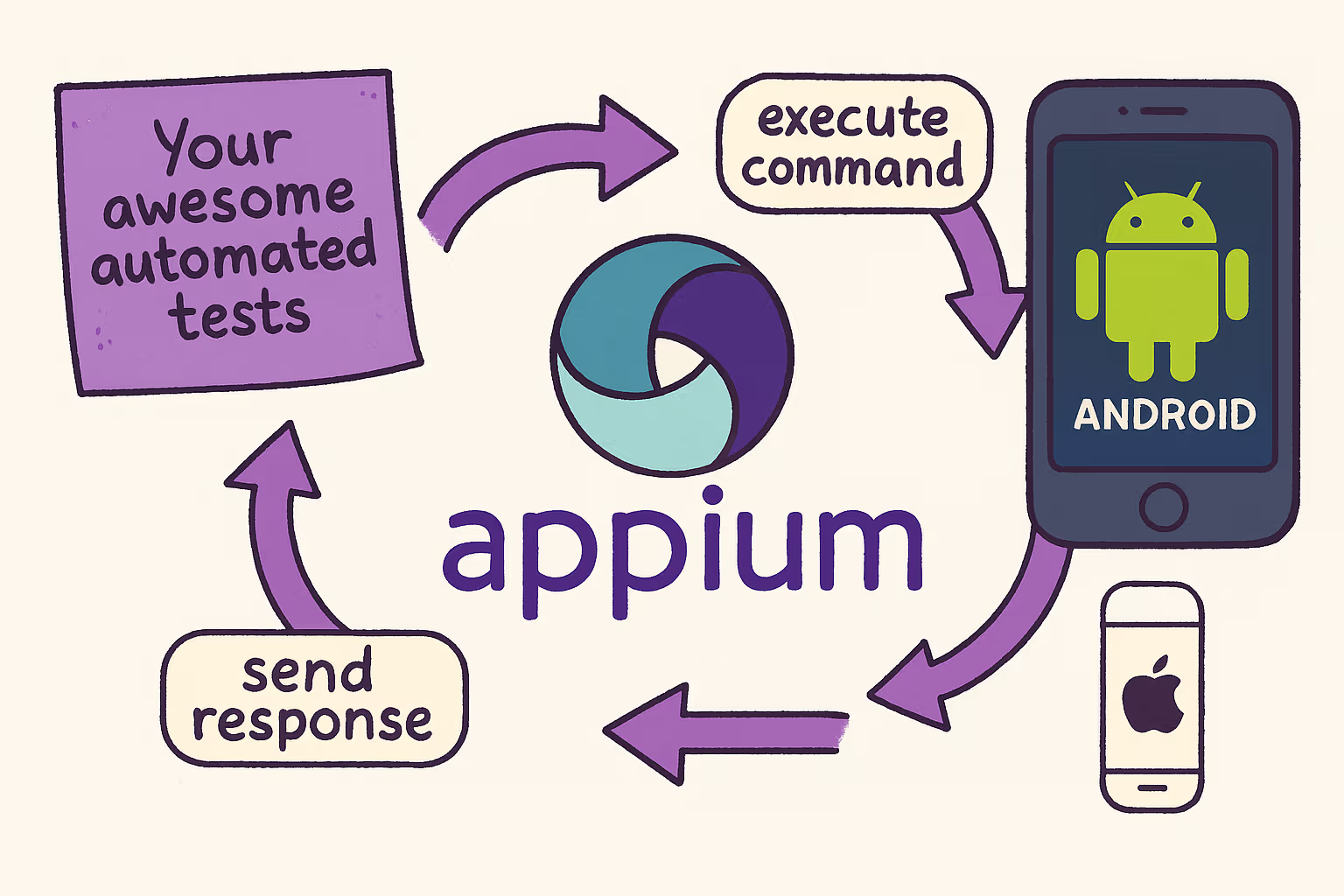
How_Apium_Works

Appium is a flexible and open-source mobile automation framework that works fine with your favorite programming languages.  Whether you're handling regression tests or juggling multiple devices, Appium is the silent workhorse keeping things steady. 

Lately, there's been a lot of buzz in the tech community around some of Appium's newer and more advanced features, like In-App Authentication using Face ID, the Events API for better debugging and test tracking, or parallel execution enhancements.


Enough talking, though. Let’s not waste another minute and jump straight into the practical side of mobile automation. 
👇 It’s time to dive in and explore some of these features together.

1. Go parallel: Speed up your Appium test runs

If you've ever written automated tests for mobile apps, you know how quickly execution time can become a bottleneck, especially as your test suite grows. Luckily, Appium has our back with a powerful feature: test parallelization. How does it help us? Instead of running one test at a time, we can run multiple tests simultaneously across different devices or emulators. The result? Faster feedback and a happier QA team. 😁 

One of the most common setups is Appium + WebdriverIO. WebdriverIO makes parallel execution straightforward with built-in support for multi-capabilities and session isolation.

🚀 How does Parallelization work in Appium?  

Appium creates a separate session for each test device. To avoid conflicts, each session needs unique capabilities, like a different udid, systemPort (for Android), or wdaLocalPort (for iOS). 

Here’s how it looks in practice:


Parallel Testing on Android & IOS with Multiple Emulators
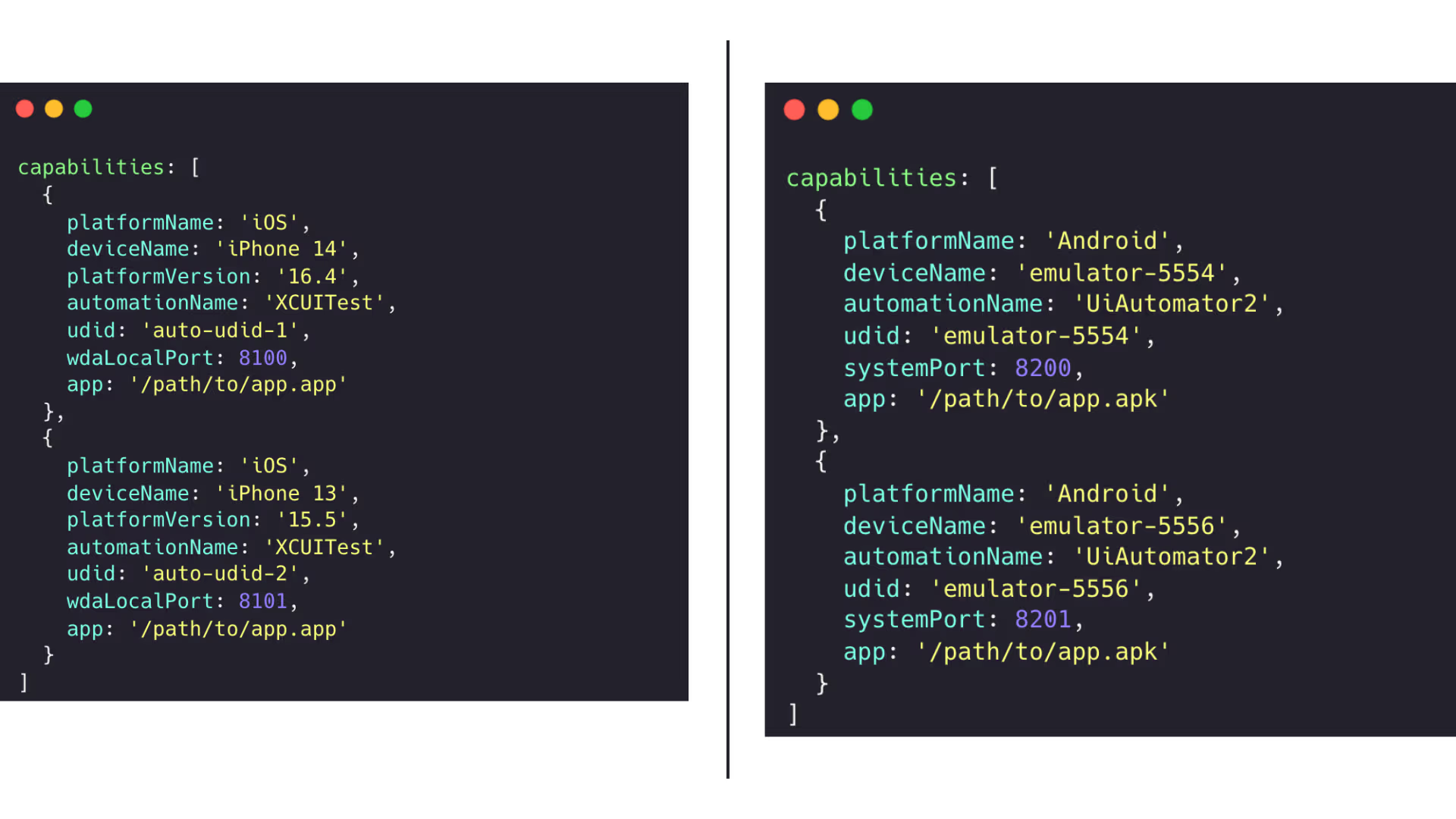
 

Multiple_Apium_Emulators

🔧 WebdriverIO config setup 

In wdio.conf.js, the following is required to enable parallel execution: 

maxInstances: 2, //or more, depending on available devices 

WebdriverIO will automatically manage multiple sessions based on your defined capabilities. You can either start multiple Appium servers on different ports or let the @wdio/appium-service handle it for you behind the scenes. 

💡Smart enhancements 

Already running tests in parallel? Awesome. Now let’s level up your setup with a few easy (but powerful) improvements: 

  1. Use dynamic port allocation with Helper functions: Build a helper function that dynamically assigns ports based on the number of instances you're running:


const getPort = (base, index) => base + index; 
 
capabilities : Array.from({ length: 2 }.map((_, i) => ({ 
platformName: 'Android', 
deviceName: `emulator-${5554 + i * 2}`, 
automationName: 'UiAutomator2', 
udid: `emulator-${5554 + i * 2}`, 
systemPort: getPort(8200, i), 
app: '/path/to/app.apk' 
}))); 
  1. Tag tests by device type or feature: If you're using Mocha or Jasmine in WebdriverIO, you can tag your tests with custom metadata. This helps you filter or prioritize certain test types in CI pipelines (e.g., smoke tests on Android only):


describe('[@android] Login flow', () => { 
it('should login successfully', async () => { 
// ... 
}); 
}); 


  1. Parallelize by feature, not just devices: You can run tests in parallel by feature/group, not only by device. In WebdriverIO, this means splitting specs in the config:


specs: ['.tests/smoke/*.js', './tests/regression/*.js'], 
maxInstances: 2, //each spec runs in its own thread 

2. Face ID: The gatekeeper we all need to automate

Biometric authentication like Face ID used to be a fancy feature, but now it’s quickly becoming the norm.  Whether talking about banking, shopping, or productivity apps, users expect fast, seamless, and secure login flows. For QA engineers, this shift brings new challenges: How do we properly test and automate something that relies on physical biometrics? 

Luckily, if you're using simulators and Appium, there's a reliable way to simulate Face ID logins without needing an actual face. No creepy masks, no 3D models. Just a few magical commands.
How_Apium_Works

There are three biometric superpowers the simulator gives you and Appium just hands you the remote. 

🎭 Enroll: "I have a face now!" 

This command simulates a user enrolling in Face ID.  

It’s crucial. Without this, Face ID is just a button that leads to disappointment.


await driver.execute('mobile: enrollBiometric', { isEnabled: true });


Use this at the start of your test run to enable Face ID support. Want to disable mid-test? No problem! Just set:


isEnabled: false 

👩 Match: "Hello, it’s me." 

This command simulates a successful Face ID scan, just like looking into the camera and getting instantly recognized. It’s useful for testing login, payment confirmation or any flow that requires user authentication.


await driver.execute('mobile: sendBiometricMatch', { 
type: 'faceId', 
match: true 
}); 

❌ Non-Match: "I don’t know you, stranger."


This one fakes a failed biometric attempt. Maybe you’re trying to simulate a sleepy user who’s holding the phone upside down. 

The app should say “Access denied” and your test should validate the correct response.


await driver.execute('mobile: sendBiometricMatch', { 
type: 'faceId', 
match: false 
}); 


Automating face ID may sound like hacking reality, but actually, it just allows you to guide the simulator to play along 
The right Appium commands make it possible to orchestrate your identity (not fake it!). Just like that, you can simulate both successful and failed Face ID interactions without ever lifting your eyebrows. 

Here’s a quick GIF showing how the magic happens on the iOS simulator: 
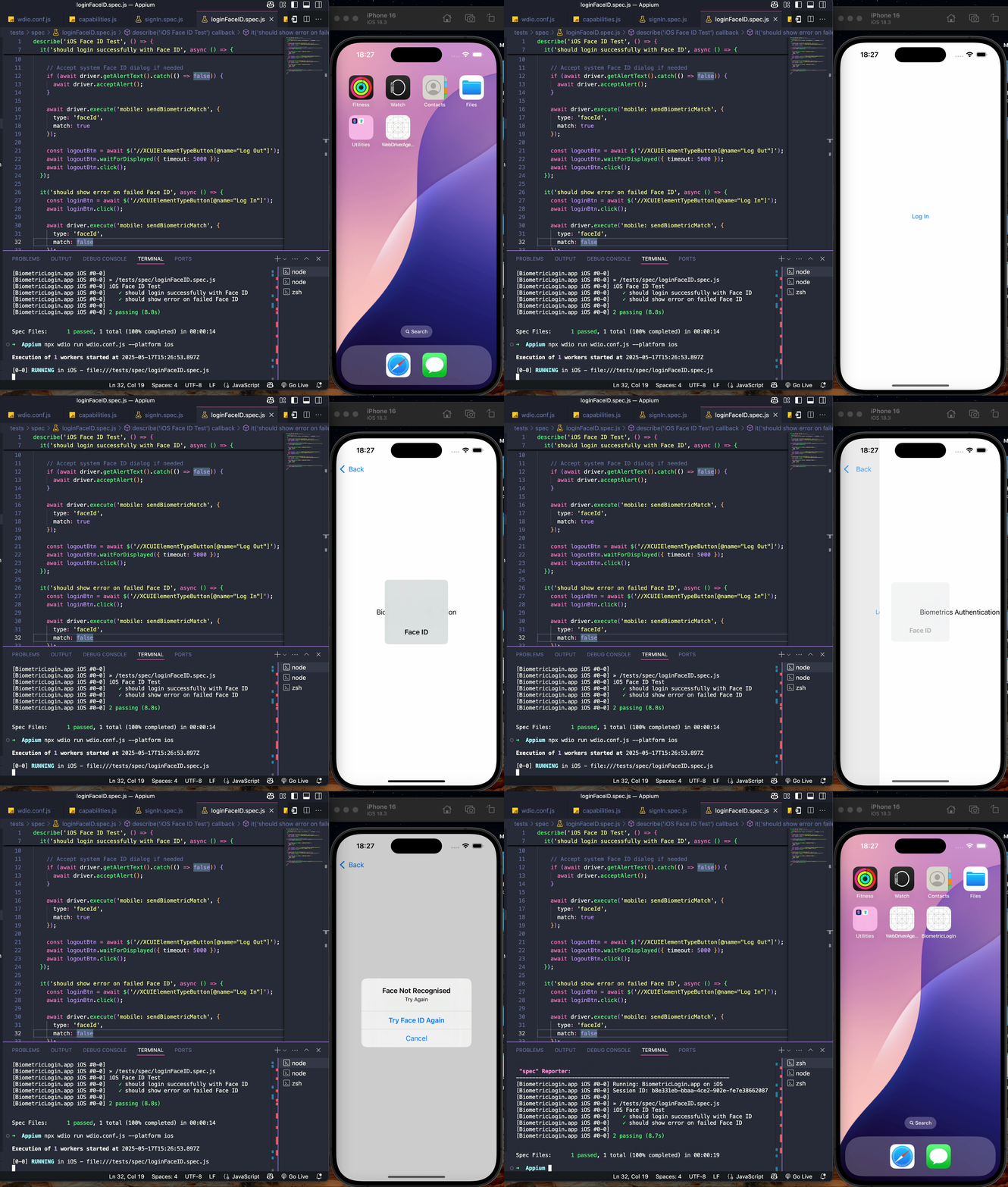


Now go forth and automate like the QA wizard you are. ✨ 

3. Events API: Understanding performance bottlenecks

Let’s be honest, we’ve all run a test and wondered: “Why is this taking so long?” 

You open logs, throw in some console.log() calls, maybe even rerun the test with a stopwatch in hand… but the answers often remain fuzzy. 

That’s where the Appium Events API comes into play by giving you a clear, behind-the-scenes view of what your automated tests are really doing.


🔍 What is the Appium Events API?


This API emits detailed, structured data about every command: when it starts, how long it takes to execute, how long it takes to communicate with the server, and whether any delays are sneaking between steps. 

It’s like X-ray vision for your mobile automation test performance.


If you're using WebdriverIO, integrating this insight is really simple. With just a few hooks in your wdio.conf.js, you can monitor each Appium command and measure its duration.  

Why does this matter? Because it puts you in control. You can quickly pinpoint bottlenecks, understand how your app responds to real-world interactions, and compare different builds to catch performance regressions before they reach users. It also helps you optimize your test scripts by identifying unnecessary waits or redundant actions. 

Already convinced? Great, so let’s skip the fluff and dive into a concrete example. 


Inside your wdio.conf.js, you can hook into two lifecycle events: beforeCommand and afterCommand :


const commandTimings = {};
beforeCommand: function (commandName, args) { const start = Date.now(); commandTimings[commandName] = { start, args }; console.log(`[COMMAND] ${commandName} → ${JSON.stringify(args)}`); },
afterCommand: function (commandName) { const end = Date.now(); const duration = end - commandTimings[commandName].start; console.log(`[RESULT] ${commandName} ← Duration: ${duration} ms`); },


  • beforeCommand runs just before any WebDriver/Appium command is sent (e.g., click, setValue, execute). It logs the time and the command’s arguments.
  • afterCommand fires right after the command completes. It calculates and logs the total duration of that command. 


Now, if we take the biometric authentication example from earlier and run the test, we’ll be able to see the following output in the console:
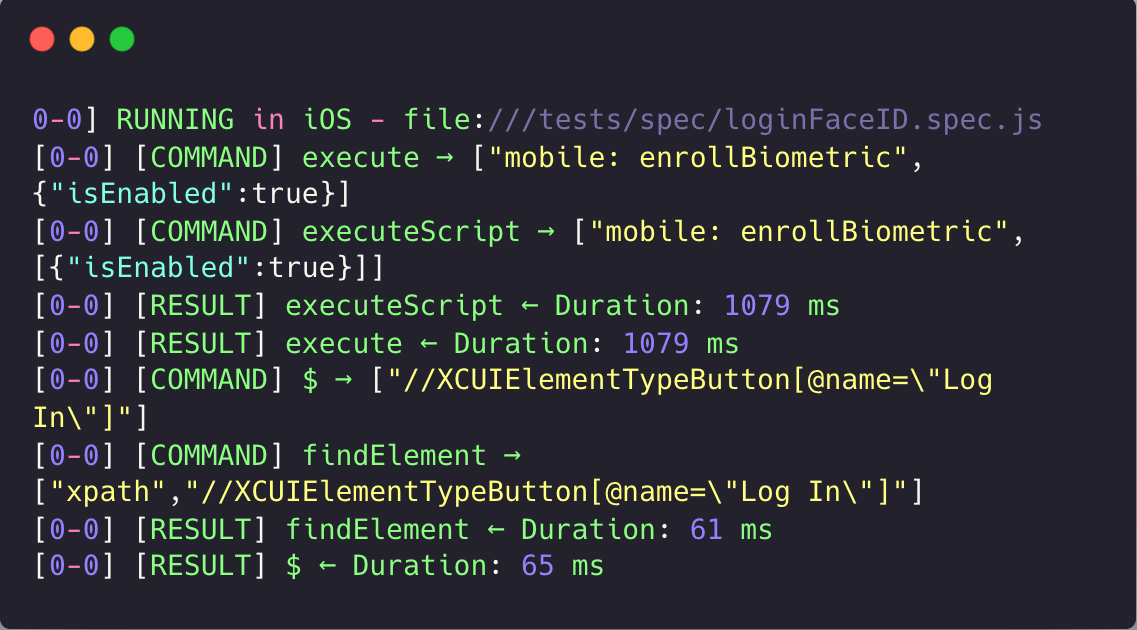
 

Apium_Biometric_Authentication

You can clearly see how long each step takes. If a simple click is taking nearly 700ms, that might be a sign of slowness in the app or some unnecessary overhead in your test. 


🧰 Bonus: Make It Scalable


If you're running mobile automation tests at scale and want to go beyond basic console logs, you can enhance visibility and performance analysis by integrating your results into a more robust monitoring workflow. 


Start by exporting command performance data using a custom WebdriverIO reporter, either in JSON or CSV format. Once you have these structured logs, you can pipe them into external platforms like Allure, Grafana, or DataDog for deeper insights. This allows you to track trends, identify slow operations, and visualize metrics through a lightweight dashboard, fully tailored to your team’s needs. 


If you care about speed, efficiency, and clean feedback loops, give it a try. It might just save you hours of confusion and help your tests feel more like a high-performance engine than a black box. 

Closing thoughts: Why Appium just makes sense

To wrap things up, Appium continues to stand out as one of the most flexible and powerful tools for mobile automation. Whether you're working on native, hybrid or mobile web apps, Appium provides a unified framework that speaks your language. That includes keeping up with modern features like parallelization, biometrics and performance monitoring. 

What makes Appium really shine is its ability to integrate naturally into the real-world software development lifecycle. More than clicking buttons or filling in forms, it means enabling realistic, user-focused automation that mirrors how your app behaves in production. Moreover, with tools like the Events API, Appium empowers teams to go beyond basic assertions and truly understand how their apps perform under the hood. 


💡 Feel free to explore our GitHub repository for full code examples and implementation details: 
 AlinaEnea0/appium-tutorial: How to Level Up Your Mobile Automation Strategy Using Appium 


Are you ready to take the next step and walk through building the actual performance pipeline step by step? 

Stay tuned and keep testing smart. 🚀 
Share on:

I have read and understood the ASSIST Software website's Terms of Use and Privacy Policy.

Want to stay on top of everything?

Get updates on industry developments and the software solutions we can now create for a smooth digital transformation.

Frequently Asked Questions

1. Can you integrate AI into an existing software product?

Absolutely. Our team can assess your current system and recommend how artificial intelligence features, such as automation, recommendation engines, or predictive analytics, can be integrated effectively. Whether it's enhancing user experience or streamlining operations, we ensure AI is added where it delivers real value without disrupting your core functionality.

2. What types of AI projects has ASSIST Software delivered?

We’ve developed AI solutions across industries, from natural language processing in customer support platforms to computer vision in manufacturing and agriculture. Our expertise spans recommendation systems, intelligent automation, predictive analytics, and custom machine learning models tailored to specific business needs.

3. What is ASSIST Software's development process?  

The Software Development Life Cycle (SDLC) we employ defines the stages for a software project. Our SDLC phases include planning, requirement gathering, product design, development, testing, deployment, and maintenance.

4. What software development methodology does ASSIST Software use?  

ASSIST Software primarily leverages Agile principles for flexibility and adaptability. This means we break down projects into smaller, manageable sprints, allowing continuous feedback and iteration throughout the development cycle. We also incorporate elements from other methodologies to increase efficiency as needed. For example, we use Scrum for project roles and collaboration, and Kanban boards to see workflow and manage tasks. As per the Waterfall approach, we emphasize precise planning and documentation during the initial stages.

5. I'm considering a custom application. Should I focus on a desktop, mobile or web app?  

We can offer software consultancy services to determine the type of software you need based on your specific requirements. Please explore what type of app development would suit your custom build product.   

  • A web application runs on a web browser and is accessible from any device with an internet connection. (e.g., online store, social media platform)   
  • Mobile app developers design applications mainly for smartphones and tablets, such as games and productivity tools. However, they can be extended to other devices, such as smartwatches.    
  • Desktop applications are installed directly on a computer (e.g., photo editing software, word processors).   
  • Enterprise software manages complex business functions within an organization (e.g., Customer Relationship Management (CRM), Enterprise Resource Planning (ERP)).

6. My software product is complex. Are you familiar with the Scaled Agile methodology?

We have been in the software engineering industry for 30 years. During this time, we have worked on bespoke software that needed creative thinking, innovation, and customized solutions. 

Scaled Agile refers to frameworks and practices that help large organizations adopt Agile methodologies. Traditional Agile is designed for small, self-organizing teams. Scaled Agile addresses the challenges of implementing Agile across multiple teams working on complex projects.  

SAFe provides a structured approach for aligning teams, coordinating work, and delivering value at scale. It focuses on collaboration, communication, and continuous delivery for optimal custom software development services. 

7. How do I choose the best collaboration model with ASSIST Software?  

We offer flexible models. Think about your project and see which model would be right for you.   

  • Dedicated Team: Ideal for complex, long-term projects requiring high continuity and collaboration.   
  • Team Augmentation: Perfect for short-term projects or existing teams needing additional expertise.   
  • Project-Based Model: Best for well-defined projects with clear deliverables and a fixed budget.   

Contact us to discuss the advantages and disadvantages of each model. 

1. Is ASSIST Software a reliable company for custom engineering?

Absolutely. Our partners have given us great recommendations and reviews, leading us to win The Manifest Award for Most Reviewed Software Developers. Further proof comes from our 97% employee retention rate and ongoing client partnerships for over 8 years.  

2. Are the ASSIST Software Romanian software engineers certified?

Yes. 85% of our software programmers are certified.  

At a company level, ASSIST Software is certified and recognized by industry players such as Microsoft, AWS, Google Cloud, Adobe, Drupal, Fujitsu, ISTQB, and others.  

Our employee certifications are tremendously important as they reflect the shared commitment to long-term growth.

3. Why should I choose Romania for custom software development? 

Romania has become a significant player in custom software development, attracting businesses worldwide. Romania boasts the highest number of certified IT specialists in Europe and ranks sixth globally, surpassing even the US in tech specialists per capita.  

At ASSIST Software, what sets us apart is our team and our location: our engineers are certified, experienced, and flexible, while being in the +2 GMT time zone allows us to easily facilitate meetings with clients all over the world.

4. What team will work on my project, and where will it be located?

ASSIST Software's headquarters is in Romania, a prime country for software development outsourcing. Our 350+ software engineers speak English and have a deep passion for innovation.  

We provide regular project updates through reports, meetings, and online dashboards. Generally, you'll have access to a dedicated project manager who will be your point of contact for any questions or concerns.  

5. How much will my project cost me?

Our prices are competitive, and as per our working model, we guarantee you will be satisfied with the result. Frequent meetings, check-ins, and a great communication structure will ensure this outcome.   

Project costs depend on various factors, including complexity, scope, required technologies, and team size. We'll gather detailed information about your project during the initial consultation to provide a customized quote and we guarantee that you will be able to see the benefits of bespoke software.  

1. What technologies do you work with?

ASSIST Software tackles your projects with a robust tech stack. We build native and cross-platform mobile apps, craft user-friendly web experiences, and create stunning visuals. 

Our wide-ranging expertise starts from Java, Python, and JavaScript frameworks to cutting-edge solutions like AR/VR, blockchain, and AI/ML. We also manage databases, leverage cloud platforms, and ensure flawless project execution. We're your one-stop shop for exceptional software development from concept to deployment. You can view our expertise for more details.   

2. Are you experienced in AI/ML development?

Yes. We have extensive experience in data engineering and machine learning operations (MLOps). We can employ neural networks, computer vision, and AI models to benefit your ideas.   

You can trust our long-term experience with big data, NLP, and sentiment analysis, as over the past three years, we led a European security project with 15 partners focused on detecting radicalization on social media and the dark web.

3. Do you have a research and development department and work on European Projects?

We know R&D is crucial for businesses to stay competitive and thrive in dynamic markets. Successful R&D efforts lead to developing exceptional products or services, improved efficiency and effectiveness in operations, and enhanced market positioning.   

We have established solid partnerships with 160+ European research companies, universities, and research centers (e.g., Fraunhofer, TWI, University of Heidelberg, REWE Group, SINTEF, etc.) and have participated as technical partners in over 25 EU-funded projects.  

4. Besides custom software solutions, what other services do you offer?

  • Design Thinking for Breakthrough Products:  

    We craft user experiences that resonate. Our design process is an immersive collaboration, starting with workshops to uncover your vision and user needs. We conduct market research, analyze the competition, and guide you toward cutting-edge solutions in accordance with your business requirements.  

  • Digital Transformation to Reimagine Your Business:

    Digital transformation is nothing less than a strategic shift. We empower you to become more agile and data-driven, optimizing core processes for the digital age.  

  • Scale with Confidence as We Build for Growth:  

    We understand that business success and development mean new challenges. Our solutions are built to scale seamlessly, accommodating increasing user bases and data volumes without sacrificing performance or security.  

5. As a company, does ASSIST have its own software products?

Yes, ASSIST Software teams have been involved in designing and developing innovative products that address community needs. One such example is the web and mobile platform Autisma. This therapy assistant enables continued learning for children diagnosed with autism spectrum disorder.   

Our extensive knowledge of the Unity and Unreal engines has allowed us to develop two mobile games, Elly and the Ruby Atlas and Hooman Invaders, as well as various Unity Assets, such as the Real-Time Weather PRO and Easy Sky. These two Unity assets allow Unity developers to control the weather and sky in their projects.   

1. Is ASSIST Software hiring right now?

We are always looking for great people to join our team, whether you're a senior software engineer or a new talent seeking an IT career. Please check our careers page and contact us. Our HR department will contact you as soon as possible.   

2. Is ASSIST Software organizing internships?

Yes. Each year, we organize individual and group internships for students. Our long-term partnership with the Stefan cel Mare University of Suceava allows us to put together great events for students and help them get started in the industry. 

3. What type of learning culture does ASSIST Software encourage?

Our focus on innovation comes from a 'can do' attitude and the continuous learning we encourage our colleagues to pursue. We frequently organize workshops, learning sessions, presentations, and masterclasses. All these events are free and open to our colleagues and aim to support their professional and personal development. 

4. How does ASSIST Software focus on teamwork?

The key to stellar teamwork is the quality time we spend together. ASSIST employees and their families are frequently invited to participate in all activities. We encourage a healthy lifestyle by promoting and organizing hikes, bike riding sessions, marathons, volleyball, football and tennis matches, ping-pong championships, and many more.   

We show our care for the environment through reforestation campaigns and forest cleaning activities.   

We also have an English-speaking club, e-sports gaming nights, tech discussions, networking parties, and board game sessions.   

5. How does ASSIST Software give back to the community?

Volunteering and charity are essential to us, which is why we founded the ASSIST Humanitarian Foundation. We genuinely care about our community and want to improve the future. We invest in IT equipment for schools and award excellent teachers. We also help hospitals and fire departments enter the 21st century.   

We sponsor cultural events and deliver humanitarian aid to those in need. If you agree with our views, you can also donate.   

ASSIST Software Team Members