Integrating Liquid AI into a Flutter App
Introduction
Liquid AI is a new MIT-spun startup building a different kind of AI, one designed to run efficiently anywhere, from phones and laptops to cars and tiny embedded chips. Instead of relying on massive cloud-based transformer models, Liquid AI uses liquid neural networks, a lightweight and adaptive architecture inspired by biological systems.
What Liquid AI Does
Liquid AI develops Liquid Foundation Models (LFMs), efficient, general-purpose models that work with text, images, audio, video, sensor data, and multimodal tasks. These models are designed to integrate with real-world systems across various industries.
Key Advantages
1. On-Device & Edge AI
Liquid AI’s models run locally, enhancing privacy, speed, reliability, and cost — eliminating the need for a constant cloud connection.
2. High Efficiency
Their models use far less memory, computing power, and energy, making them ideal for consumer electronics, vehicles, wearables, and industrial hardware.
3. Enterprise Integration
They help companies embed efficient AI into finance, biotech, robotics, e-commerce, and aerospace workflows.
4. Real-Time Processing
Liquid networks excel at tasks involving movement, time, and continuous data, such as robotics control, object tracking, and forecasting.
Why "Liquid" Models Matter
Liquid neural networks offer significant benefits:
· Adaptable: They adjust their behavior continuously.
· Interpretable: Easier to analyze than giant transformers.
· Efficient: Perform well on small processors.
· Cloud-Independent: Reduce reliance on data centers.
Funding & Growth
Liquid AI recently raised $250 million, led by AMD and major investors, enabling the team to scale research, build new models, and expand its enterprise partnerships.
Why It's Important
Liquid AI aims to make AI:
· Smaller
· Faster
· Cheaper
· More private
· More energy-efficient
· More flexible
If successful, it could shift the industry toward smarter, distributed, on-device AI instead of giant cloud-only systems.
AI Notes App
Overview
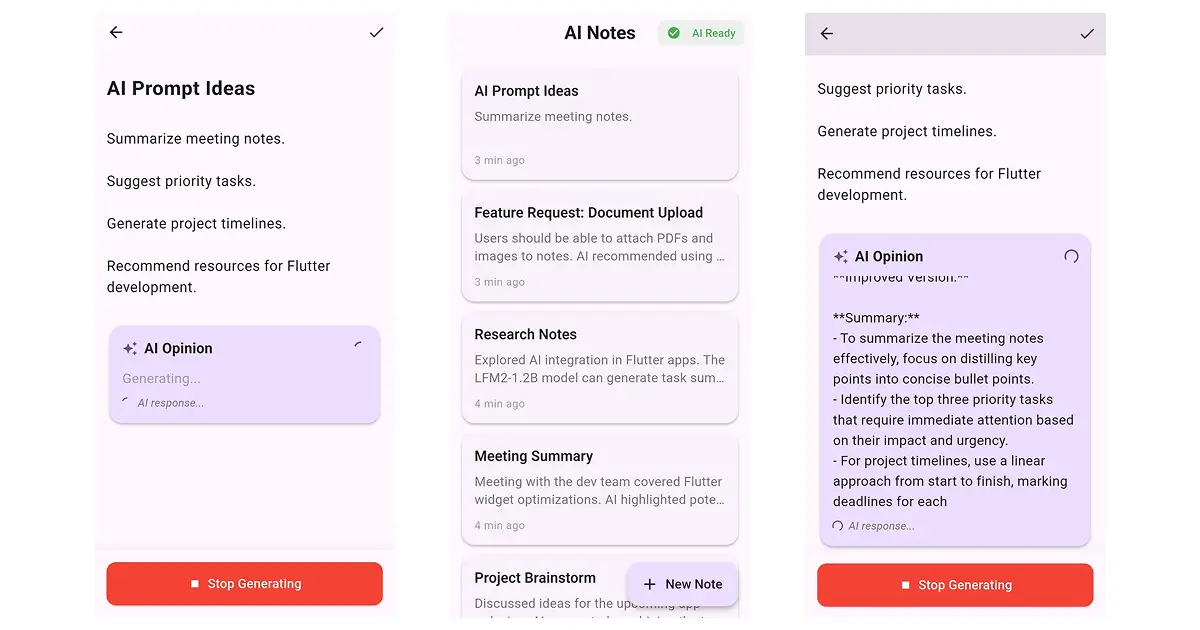
AI Notes App is a modern note-taking application built with Flutter and powered by Liquid AI, using the LFM2-1.2B model to deliver contextual feedback and intelligent suggestions. The goal of the app is to transform traditional notes into interactive, AI-enhanced experiences where user entries become dynamic sources of insights, refinements, and real-time improvements. Unlike conventional note-taking tools, the AI Notes App understands context, tracks the evolution of ideas, and helps users develop their thoughts through continuous feedback powered by Liquid AI.
Features
· Note Taking - Create, edit, and organize notes
· AI Opinions - Get intelligent feedback on any note
· Conversation Memory - AI remembers previous interactions per note
· Multi-language - Automatic language detection (8 languages)
· Streaming Responses - Real-time token-by-token generation
· Auto-save - Notes saved automatically
· Dark Mode - Full dark theme support
· Copy Response - Copy AI opinions to the clipboard
Conversational memory: AI that understands the evolution of ideas
One of the most valuable features of the AI Notes App is that each note maintains its own conversation history with the AI. This allows the model to understand how an idea evolves and provides increasingly relevant insights.
For example, when a user revisits a note and edits or expands it, the AI recognizes the changes and adapts its response accordingly. It does not repeat previous feedback but instead builds upon new information. This results in a high level of personalization and continuity in the user’s workflow.
Over time, this memory system creates a sense of continuity that mimics long-term collaboration with a knowledgeable partner. The AI can identify patterns in the user’s thought process, recall previously discussed challenges, and proactively suggest improvements or directions. This transforms note-taking into an iterative learning experience, where the AI becomes increasingly attuned to the user’s preferences and goals.
Real-time streaming
The application delivers AI feedback through real-time, token-by-token streaming, allowing users to see responses as they are generated. This creates a fluid, conversational experience that feels natural and dynamic, especially when working with longer or more complex notes.
This streaming approach not only improves responsiveness but also encourages users to engage in iterative refinement. As they watch the AI’s text unfold, they can interrupt, steer the direction of the output, or naturally shift into a conversational style. The immediacy of feedback fosters a creative loop in which ideas evolve rapidly without disrupting the writing flow.
Multi-language support
AI Notes App also includes automatic language detection, enabling it to respond in the same language as the user’s input without any manual configuration. The application supports the following languages: English, Arabic, Chinese, French, German, Japanese, Korean, and Spanish.
Because of its multilingual capabilities, users can also switch languages mid-note or mix expressions from different cultures without disrupting the AI’s understanding. This is particularly beneficial for bilingual writers, international teams, and users who take notes in one language but think or plan in another. The model’s seamless handling of linguistic variety makes the app accessible worldwide.
Use Cases
· Personal journaling with AI insights
· Meeting notes with AI summaries
· Brainstorming with AI feedback
· Creative writing assistance
· Study notes with AI review
An Offline Solution
AI Notes App follows an offline architecture, meaning the AI model can run directly on the user’s device, without requiring a constant internet connection. This provides enhanced data security and increased control over sensitive information. This means:
· Reduced security risks
· Less dependency on external cloud services
· Better control over internal data (meeting notes, strategies, plans, etc.)
All notes are stored locally using efficient saving mechanisms, ensuring users never lose their information.
The offline architecture also ensures reliability in environments where connectivity is limited, such as during travel, remote work locations, or private corporate settings. Users can continue generating AI insights without interruption, making the tool dependable in situations where traditional cloud-based assistants would be inaccessible. This makes the app especially valuable for privacy-conscious industries.
Example Usage Flow
Creating a Note
1. Tap the "New Note" button.
2. Enter title and content.
3. Tap the "Get AI Opinion" button.
4. AI streams response in real-time.
5. Save the note if you want.
Conversation Context
User creates a note: Title: IT
Content: I want to learn how to create simple Flutter apps.
AI’s opinion: “The note is straightforward and aims to guide the reader on creating simple Flutter apps. The structure is clear, with a title indicating the topic and content offering a specific goal…”.
As users become accustomed to the flow, they develop a natural rhythm of writing, reflecting, and revising with the AI’s help. The process feels like collaborating with a personal editor who is available at any moment. This streamlined workflow encourages users to capture ideas quickly and refine them later with AI support.
Let's Build Your First App
This section shows how to integrate Liquid AI into a Flutter project using the LFM2-1.2B model. You will prepare your project structure, set up the required files, and configure your environment to run Liquid AI fully offline. It outlines the model, necessary bundle, and folder structure needed to get started. The goal is to provide a practical foundation for creating.
AI-powered applications by leveraging the Liquid AI model and corresponding developer tools.
Prerequisites
Before integration, developers need to download the model bundle from Liquid AI and set up the necessary directory structure within the Flutter project. These prerequisites ensure the app can load the 1.2B-parameter model locally, enabling offline inference and high-performance on-device AI.
Download the bundle from Liquid AI: https://leap.liquid.ai/models?model=lfm2-1.2b
Create the model and the bundle name directory, and place the model bundle file:
“project_name/assets/models/LFM2-1.2B/”
Flutter setup
Integrating Liquid AI into Flutter involves using the flutter_leap_sdk package. This section explains that developers must include the SDK in their project and use it to interact with the model efficiently. With proper configuration, Flutter apps can run generative AI functionality directly, eliminating the need for cloud APIs.
Dependencies
The required dependencies enable the app to handle AI inference, date formatting, and local storage. The section clarifies how to configure the pubspe c.yaml file, ensuring the project has everything it needs to manage user settings, run the AI model, and maintain smooth operation within Flutter.
Add these dependencies in the pubspec.yaml file
Android configuration
Add this to your android/app/build.gradle.kts file
Project Structure
Maintaining this structure also allows teams to collaborate efficiently, as each component of the app has a clear place within the hierarchy. As the project grows, developers can expand services or add new modules without disrupting existing logic, ensuring long-term maintainability.
Most important files
Note model (note.dart)
Defines note content, timestamps, AI opinions, and conversation history. Notes evolve as Liquid AI interacts with them, capturing both content and context.
AI Service (ai_service.dart)
Handles model initialization, language detection, streaming responses, and cancellation. As the central access point for Liquid AI, this service allows global behavior to tune across the entire app.
Lifecycle & State
· initializeModel({offlineOnly}) → Future<void>
Purpose: Deterministic, offline‑first boot of the model. The service tries three paths in a strict order:
o _findExistingModel() — reuse a cached model if present (fast path).
o _copyModelFromAssets() — copy a bundled .bundle to a writable path (guaranteed offline).
o Download — only if offlineOnly == false, then load the model by name.
Behavior: Publishes AIStatus transitions (loading, downloading, ready, error) and updates downloadProgress during network fetches.
Why it matters for devs: You don’t need a settings screen or user prompts about “where the model lives.” Ship with assets for predictability; allow download as an enhancement. The UI can cleanly bind to status, download progress, and error message.
· getModelInfo() → Future<Map<String, dynamic>>
Purpose: Returns {exists, path, size, files, bytes} describing the current model directory. Uses _formatBytes() for readability.
Why it matters: Operational transparency for a “Model health” card—useful for support, QA, and storage guidance.
Generation & Control
· getOpinionOnNoteStream({required Note note}) → Stream<String>
Purpose: The UX centerpiece—cancellable streaming of AI output. Internally:
o Checks AIStatus.ready (throws if the model isn’t loaded).
o Runs detectLanguage() on the note title + content.
o Checks support via isLanguageSupported().
o Builds the user prompt with _buildContextAwarePrompt() (includes empty‑note encouragement logic and explicit language instruction).
o Builds the system/policy prompt with _getSystemPrompt() (strict language rules when supported; soft fallback when not, plus behavior like “Analyze vs Rewrite” and the “Improved Version” label).
o Streams chunks via generateResponseStream(...).
o If a per‑note stream is cancelled or encounters errors, the generator breaks and yields _getFallbackMessage(language) for a graceful UI.
Why it matters: Ties the generation lifecycle to domain objects (note.id), making concurrency and navigation straightforward.
· cancelGeneration(String noteId) → void
Purpose: Per‑note cancellation. Closes the corresponding controller in _activeStreams and removes it from the list. The generator loop checks for this and exits cleanly.
Why it matters: Instant cancel on route changes or when switching notes—no global flags or race conditions.
Language Handling
· detectLanguage(String text) → String
Purpose: Lightweight regex scorer over Spanish, French, German, Chinese, Japanese, Korean, Arabic; defaults to English when confidence is low.
Why it matters: Lets UI set expectations (“Reply in …”) and lets the system/policy prompt enforce or relax language rules appropriately.
· isLanguageSupported(String language) → bool
Purpose: Gate the strict language rule. Supported languages receive rigid enforcement (“must reply only in X”); unsupported ones receive best-effort support with an English fallback.
Why it matters: Avoids mixed‑language replies that erode trust, while remaining inclusive for languages outside the supported set.
The Private Seams (what they do, and why they exist)
· _findExistingModel() → Future<String?>
What it does: Searches app document directories for:
o …/models/LFM2-1.2B/<bundle> — the explicit model directory;
o …/leap/LFM2-1.2B — the SDK’s conventional path.
Returns the path if found, null otherwise. Why it exists: Enables instant readiness on subsequent launches and after previous downloads—no copy or download needed.
· _copyModelFromAssets() → Future<String?>
What it does: Copies assets/models/LFM2-1.2B/<bundle> into …/models/LFM2-1.2B, creating directories as needed. If already present, returns the path without rewriting. Why it exists: Guarantees a model for offline‑only or first‑run scenarios; makes startup deterministic.
· _buildContextAwarePrompt({note, detectedLanguage, isSupported}) → String
What it does: Assembles the user prompt with:
o Title and content;
o Language instruction: strict if supported, soft if not;
o Special case for empty notes: encourages or suggests a creative starter.
Why it exists: Keeps the “ask” consistent and unambiguous across notes and languages.
· _getSystemPrompt(detectedLanguage, isSupported) → String
What it does: Encodes behavior and guardrails:
o Language policy (strict vs soft);
o Guidance: analyze vs rewrite, specificity, tone, and the “Improved Version” label when rewriting.
Why it exists: A single, versionable source of truth for how the assistant behaves—change here to adjust outputs globally without touching business logic.
· _getFallbackMessage(language) → String
What it does: Returns a localized short message for failure conditions (ES/FR/DE/ZH/JA/KO/AR; defaults to English).
Why it exists: Avoids blank UI states during transient errors; respects the user’s language whenever possible.
· _formatBytes(bytes) → String
What it does: Converts raw sizes into B/KB/MB/GB strings.
Why it exists: Better diagnostics and storage UX—no mental math required.
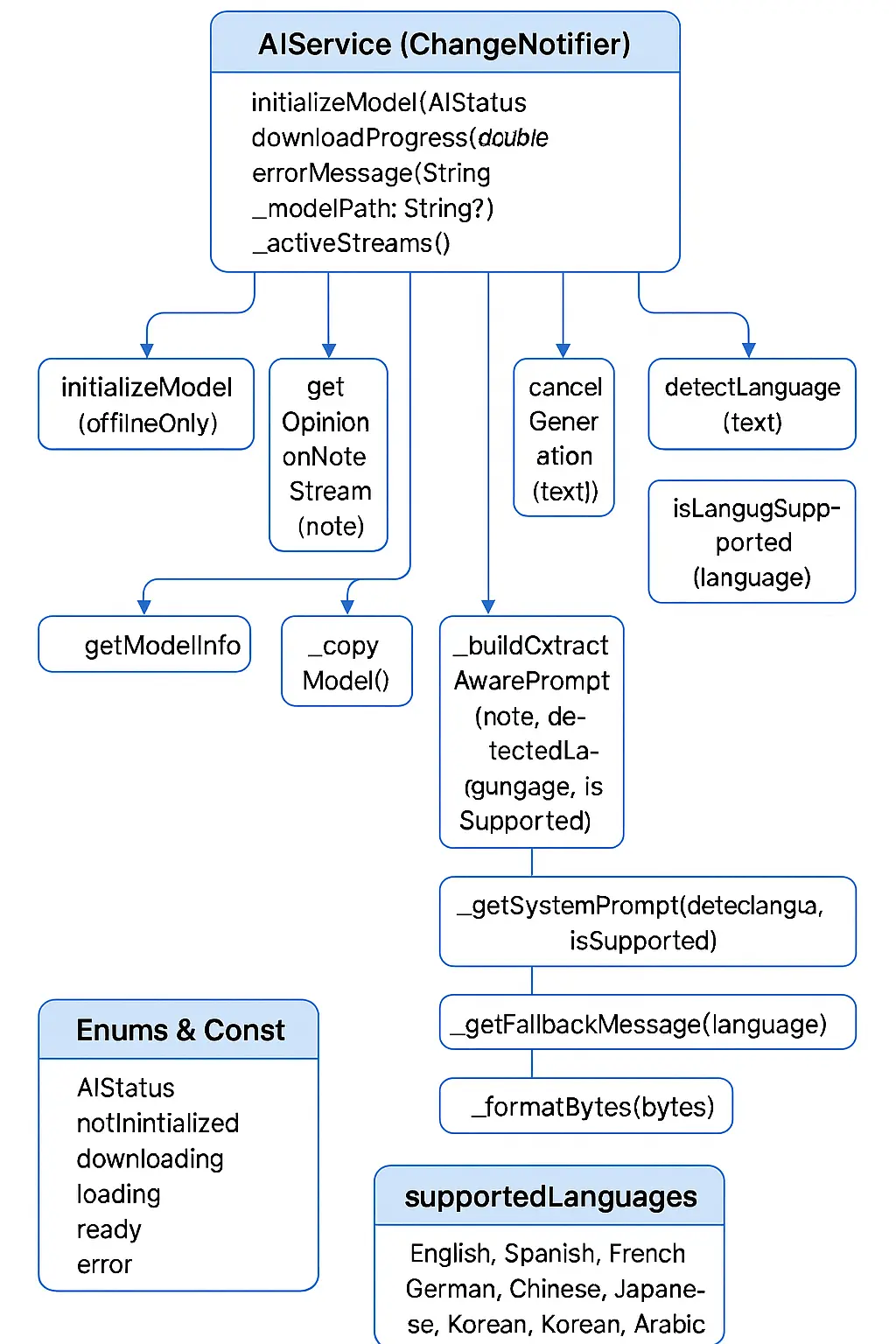
This example demonstrates how to utilize the AIService class to interact with an AI model within a Flutter/Dart application. It demonstrates checking if the AI is ready, showing download progress, streaming AI-generated content in real time, handling errors, canceling generation, detecting the note’s language, and retrieving model diagnostics.
Because the AI service is centralized, developers can fine-tune behavior globally, adjusting prompts or output styles for the entire app. This makes it easy to evolve the AI’s personality, tone, or capabilities as the product grows or targets new use cases.
Storage Service (storage_service.dart)
Manages local persistence using SharedPreferences. Future updates may add encryption, database support, or advanced search features for larger note collections.
Prompting
Liquid AI utilizes a system prompt to shape its thinking and responses. This prompt serves as the AI’s internal guide, defining its tone, style, behavior, and the rules it follows when generating answers.
The best part is that users can customize this system themselves.
Adjusting this prompt allows you to transform the AI into a mentor, editor, creativity assistant, productivity coach, or any role suited to your app’s purpose.
Experimenting with prompts allows developers to create specialized experiences, such as an AI that acts as a mentor, editor, brainstorm partner, or productivity coach. Adjusting tone, priorities, and constraints in the system prompt can dramatically alter the app’s usefulness for different audiences.
Examples of Prompt Variants
Use these templates when you want to extend Liquid AI’s behavior for different features.
Where?
A. Summarization Prompt
You are an assistant who summarizes notes while keeping all the important meaning.
Task:
- Read the user’s note.
- Generate a short, clear summary.
- Preserve main ideas and actionable information.
- Do NOT add new information.
Format:
Summary:
{your summary here}
B. Rewrite for Clarity Prompt
You are an assistant who rewrites text to be clearer, more concise, and easier to understand.
Instructions:
- Keep the original meaning.
- Improve structure, grammar, and flow.
- Do not change the tone unless necessary.
Return only the rewritten version.
C. Actionable Feedback Prompt
You are an assistant who gives actionable, specific feedback.
Instructions:
- Identify the strengths of the note.
- Point out weaknesses clearly.
- Suggest concrete improvements.
- Keep response structured and easy to follow.
Format:
Strengths:
-
Weaknesses:
-
Improvements:
-
Liquid AI receives both and decides:
· whether to rewrite
· whether to offer feedback
· how to stay in the detected language
· how to structure the response
Run the app and see the results.
After configuring the project, run the app to verify that Liquid AI loads correctly, streams responses as expected, and handles user interactions smoothly. Refinements such as improved animations, status indicators, or loading feedback can be added once the core functionality works.
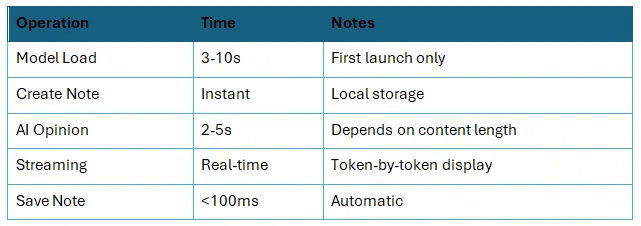
Performance
Performance was tested on the Samsung A53 device.
Storage Limits
· Notes: Unlimited (within device storage)
· Note Size: No limit (practical: ~10K characters)
· Conversation History: Full history saved per note
· Model Size: ~1.2GB on device
Although notes are stored locally, users with extensive content may eventually require tools for exporting, archiving, or backing up data. Adding these options can prevent storage overload and give users more control over long-term note management.
Conclusion
Integrating Liquid AI into a Flutter application enables powerful offline AI features such as contextual understanding, intelligent suggestions, and real-time feedback—all while prioritizing privacy and device-based performance. By combining Liquid AI’s capabilities with clean prompting, structured note handling, and efficient storage, developers can build dynamic tools that adapt to user needs and elevate productivity without relying on the cloud.