Homo Digitalis: Why Testing Remains Human in the Age of Automation
Introduction: Homo Digitalis in 2062
The Evolution of QA: From Manual to Automated Testing
Manual Test Examples
Automated Test Example
The Human Factor in Quality Assurance
Example: UX Issue Detected Only Through Human Testing
Manual Testing vs Automated Testing vs Exploratory Testing
Conclusion
Author
Frequently Asked Questions
Introduction: Homo Digitalis in 2062
In 2062: The World That AI Made, Toby Walsh imagines a future shaped by artificial intelligence, algorithms, automation, and intelligent machines. In this vision, humanity evolves into Homo digitalis: a new kind of human deeply connected to digital systems, surrounded by smart technologies, and constantly interacting with data networks.
As we move closer to this future, one important question becomes harder to ignore: what remains human when technology can automate more of our work?
In software development and Quality Assurance, this question is especially relevant. QA automation, artificial intelligence, and algorithm-driven testing tools are transforming how teams validate, monitor, and release software products. Automated tests can run faster than humans, AI can assist with test generation, and modern tools can analyze large volumes of data with impressive speed.
Yet, even in this increasingly automated environment, the role of the human tester does not disappear. It evolves.
Software testing is not only about confirming that a system behaves according to predefined requirements. It is also about understanding whether that system is usable, reliable, accessible, meaningful, and valuable for the people who depend on it.
This article explores why, in the age of automation and AI, testing remains a human activity. It also explains why Homo digitalis must preserve critical thinking, creativity, empathy, and exploratory judgment to ensure software quality in the digital future.
The Evolution of QA: From Manual to Automated Testing
Quality Assurance has changed significantly over time. In the early days of software development, testing was almost entirely manual. Testers followed predefined checklists, clicked through applications, entered data, verified results, and used their own judgment to determine whether the product behaved as expected.
This process was slower and often repetitive, but it had an important advantage: it allowed testers to observe the software from a human perspective. A manual tester could notice unclear messages, confusing layouts, inconsistent design, accessibility problems, or user flows that felt unnatural.
Manual Test Examples
Goal: Verify that a user can log in with valid credentials.
Manual steps:
- Open the web application.
- Navigate to the login page.
- Enter a valid username.
- Enter the correct password.
- Click the Login button.
- Confirm that the user is redirected to the Dashboard.
- Check that the welcome message appears correctly.
- Review the interface for layout, alignment, responsiveness, and clarity.
In this scenario, the tester does more than verify a technical result. They also evaluate the user experience. They check whether the login flow is clear, whether the design is consistent, whether the message makes sense, and whether the page works properly across different screen sizes.
As software systems became more complex and release cycles became faster, the industry moved toward automated testing. Tools such as Selenium, Playwright, and Cypress enabled automated testing of repetitive test cases, regression testing, cross-browser validation, and other recurring QA activities.
Automated Test Example
An automated test can follow the same basic login steps as a human tester. It opens the application, enters the credentials, clicks the login button, and verifies that the expected dashboard page appears.
What it does:
The automated test executes predefined steps and validates expected results through code.
Main advantage:
The same test can be executed hundreds or thousands of times across browsers, devices, and environments without manual intervention.
Automated testing brings speed, consistency, and scalability. It is essential for modern software development, especially in agile, DevOps, and continuous integration environments. However, automation works best when the expected behavior is well-defined and known.
This is where the difference between automation and human testing becomes important. Automation can confirm that a known requirement is met. Human testers can question whether the requirement itself makes sense.
The Human Factor in Quality Assurance
Even as automation and AI reshape the software industry, the human element in QA remains essential. Machines are excellent at repeating tasks, executing regression suites, checking predefined conditions, and processing large datasets. However, they do not truly understand context, intention, emotion, or user frustration.
A QA engineer does more than verify that software features match specifications. They evaluate whether the product makes sense for real users.
For example, an automated script might confirm that a login form accepts a 200-character password. A human tester may ask whether such a requirement is practical, secure, or user-friendly. Automation can validate that a button is clickable, but only a human can judge whether its placement, color, wording, or visibility could confuse users.
This human perspective is critical because software quality is not defined only by technical correctness. A product can pass every automated test and still deliver a poor user experience.
Exploratory testing is one of the strongest examples of human value in QA. Instead of following a rigid script, testers investigate the software creatively. They use domain knowledge, intuition, and critical thinking to uncover unexpected issues. They try unusual inputs, simulate user mistakes, test edge cases, combine actions in unexpected ways, and explore workflows that may not be covered by predefined test cases.
These insights often reveal usability problems, accessibility gaps, business logic issues, and hidden risks that automation cannot detect on its own.
The human factor also extends beyond bug detection. QA professionals act as advocates for the end user. They raise questions about design, workflow, performance, accessibility, reliability, and product value. They help development teams understand not only whether something works, but whether it works well for the people who will use it.
A strong QA engineer asks questions such as:
What happens if the user makes a mistake here?
Is this the most intuitive way to complete the task?
Could this message create confusion?
Does this workflow support accessibility needs?
What is the business impact if this feature fails?
Which issue should be fixed first?
Another important point is that not every bug has the same level of impact. Human testers use judgment to assess risk, business value, user frustration, and product priorities. This helps teams decide which issues need urgent attention and which can be addressed later.
In the age of AI and automation, this type of judgment becomes even more important.
Example: UX Issue Detected Only Through Human Testing
An e-commerce platform relied heavily on automated tests for its checkout flow. The automated scripts validated that:
- The product could be added to the cart.
- The checkout form accepted valid billing and payment details.
- The payment was processed correctly.
- The order confirmation page was displayed after the payment was successful.
- All automated tests passed successfully, indicating that the system was functioning as expected.
However, during manual exploratory usability testing, a QA engineer observed how real users completed the purchase flow. When users reached the checkout form, they encountered a mandatory field labeled “Company Name”, even though most customers were private individuals and not businesses.
Many users hesitated. Some entered random values such as “N/A”, dots, or empty spaces. Others abandoned the checkout process because they believed the form could not be completed correctly without owning a business.
From a technical perspective, the system worked. The field accepted input, the payment process functioned correctly, and the confirmation page appeared. From a human perspective, however, the experience was unclear, frustrating, and damaging to user trust.
This issue could not be detected solely by automation, as automated scripts validate predefined functional steps. They do not detect hesitation, confusion, anxiety, or loss of confidence.
In a widely cited e-commerce usability case, removing a confusing mandatory field from the checkout process reportedly led to a significant increase in revenue. The example illustrates an important principle: automation can confirm whether a system adheres to technical rules, but human testing helps determine whether it truly works for people.
In the age of automation, the role of the tester is not diminished. It is elevated. Human testers ensure that quality is not only about passing test cases, but also about delivering products that are usable, intuitive, accessible, and meaningful.
Manual Testing vs Automated Testing vs Exploratory Testing
The table below compares manual, automated, and exploratory testing based on their approach, ideal use cases, execution speed, coverage, cost, level of human involvement, and practical examples.
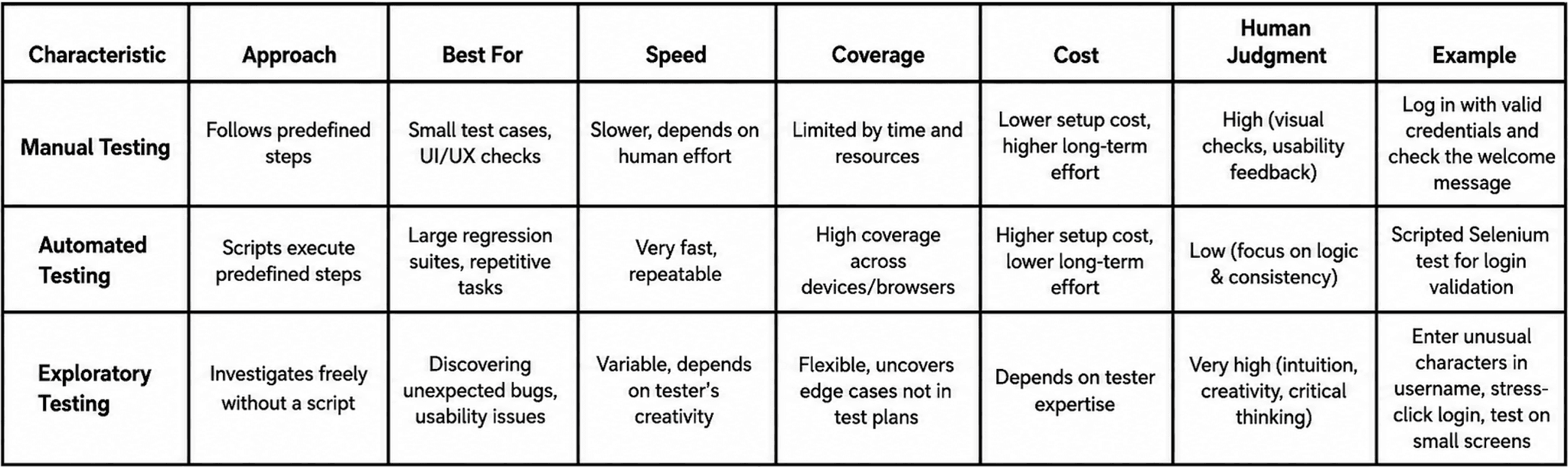
Each type of testing has a clear role in a mature QA strategy. Manual testing provides direct human observation. Automated testing provides speed and consistency. Exploratory testing provides creativity and discovery.
The strongest QA processes combine all three.
Conclusion
Automation and AI are changing the way software testing is planned, executed, and scaled. Repetitive checks, regression suites, test generation, visual validation, and defect analysis can now be supported by tools that are faster and more consistent than manual execution alone.
However, quality cannot be reduced to automation coverage or passed test cases. A reliable product must also be understandable, usable, accessible, secure, and aligned with real user needs. These qualities require human judgment.
This is where the role of the QA engineer becomes more strategic. Instead of spending most of their time on repetitive validation, testers can focus on risk analysis, exploratory testing, user empathy, product context, and the decisions that shape software quality. They become interpreters between what the system does, what the business expects, and what users actually experience.
The future of testing is not about replacing human testers with machines. It is about using automation and AI to remove repetitive work, while allowing testers to focus on the parts of quality that require curiosity, critical thinking, communication, and human understanding.
In this sense, testing remains human because software is ultimately built for people. As long as users bring expectations, emotions, mistakes, needs, and context into digital products, human testers will remain essential to creating technology that truly works.
Author
Alexandru Manolache is a QA Engineer at ASSIST Software with nearly four years of experience in software quality assurance, specializing in manual testing, test automation, and exploratory QA. They work across Agile development environments, contributing to product quality through hands-on testing with tools including Cypress and Postman, and collaborating closely with cross-functional teams to ensure reliable, user-centered software delivery.
Frequently Asked Questions
Why is human testing still important in the age of automation?
Automated testing confirms that a system meets predefined requirements. Human testing determines whether that system is usable, intuitive, accessible, and meaningful for real users. Machines can validate functional correctness, but they cannot detect hesitation, confusion, user frustration, or the business impact of a poor experience. These qualities require human judgment, empathy, and critical thinking.What is exploratory testing, and why does it matter?
Exploratory testing is a human-driven QA approach where testers investigate software creatively rather than following rigid scripts. Using domain knowledge, intuition, and critical thinking, testers uncover unexpected issues — usability problems, accessibility gaps, business logic errors, and edge cases that automated scripts cannot detect on their own. It is one of the clearest examples of irreplaceable human value in Quality Assurance.- What is the difference between manual testing, automated testing, and exploratory testing?
Manual testing involves direct human observation of software behavior against defined steps. Automated testing executes predefined scripts at speed and scale, making it ideal for regression suites and repetitive validation. Exploratory testing uses creative investigation to discover unexpected issues. A mature QA strategy combines all three automation handles speed and consistency, while human testers focus on judgment, discovery, and user empathy.