AI workflow automation in the enterprise: why process intelligence matters more than process speed
What AI workflow automation does differently from traditional process automation
Where enterprises are applying AI workflow automation
Why system design matters more than model selection
The role of AI agents in enterprise workflow automation
What a good AI workflow automation implementation looks like
How ASSIST Software approaches enterprise AI workflow automation
What will define the next stage of enterprise automation
Frequently asked questions
Companies have been automating repetitive tasks for years through scripts, rule-based integrations, and platform connectors. What has changed is the layer sitting above those rules. Software can now interpret context, handle unstructured information, and decide what happens next based on what it understands rather than what it was explicitly programmed to do. That distinction changes what automation can realistically accomplish and what organizations need to get right before deploying it.
This article covers what AI workflow automation does differently from traditional automation, where enterprises are applying it, the most common failure modes, and how to approach implementation to produce reliable results.
What AI workflow automation does differently from traditional process automation
A traditional automation moves data from one place to another according to fixed rules. If condition A is met, action B follows. That model works well for structured, predictable processes where the inputs are consistent and the decision logic is straightforward.
An AI-powered workflow operates differently. It can interpret what data means, determine whether it is complete or ambiguous, identify whether a human needs to be involved, and select the appropriate next action based on context rather than predefined rules. The difference is judgment applied at scale across processes that previously required human review at every step.
In practice, this means workflows that can extract relevant information from emails, documents, or support requests; classify and prioritize incoming tasks based on content and urgency; generate summaries or draft responses; route requests to the right team or system; and trigger follow-up actions across multiple business applications. The operational value is not in automating more tasks for its own sake. It is about reducing the time and manual effort between when information arrives and when the right action is taken.
Where enterprises are applying AI workflow automation
The use cases span most business functions, and the strongest implementations tend to share a common characteristic: the process involves repeated human judgment on unstructured information, creating a bottleneck that scales poorly as volume increases.
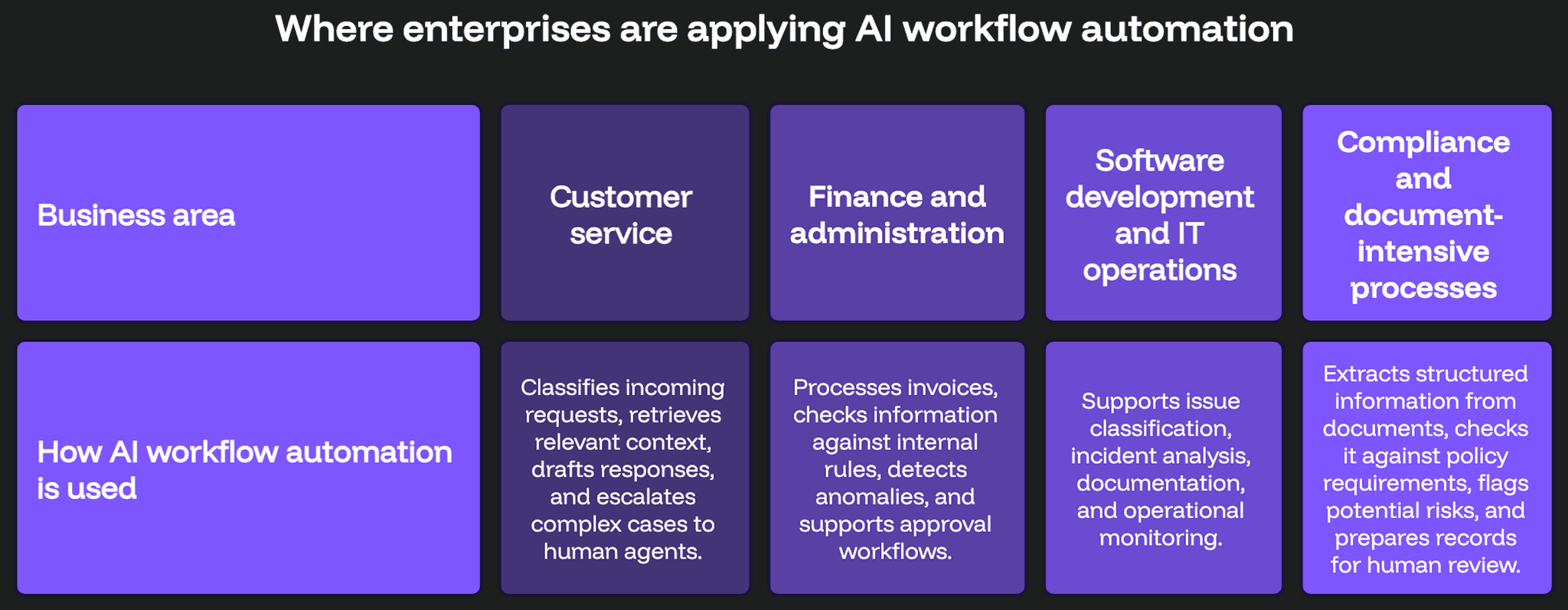
In customer service, AI systems classify incoming requests, retrieve relevant context from connected systems, draft responses, and escalate to human agents when the situation requires judgment that the system cannot reliably provide. In finance and administration, workflows process invoices, validate information against internal rules, detect anomalies, and support approval processes without requiring manual review at every stage.
In software development and IT operations, AI assists with issue classification, incident analysis, documentation generation, and operational monitoring. In compliance-heavy and document-intensive processes, AI workflows extract structured information from unstructured documents, compare it against policy requirements, flag potential risks, and prepare records for human review.
In sales and marketing, AI-powered workflows enrich leads, summarize customer interactions, generate personalized content, and coordinate follow-up activities based on engagement data. The common thread across all of these is that AI handles interpretation and routing while established systems continue to manage transactions, permissions, audit trails, and business-critical rules that require deterministic behavior.
Why system design matters more than model selection
Introducing AI into a workflow does not automatically make the process more efficient. The most common failure mode is deploying an AI component into a process that was not well understood to begin with, only to discover that the automation amplifies existing problems rather than solving them. Unclear ownership, inconsistent data, poorly defined escalation criteria, and missing integration points are problems that AI makes more visible without fixing them.
Before implementation, organizations need clarity on which steps genuinely require AI judgment and which are better served by deterministic rules. They need to know what data the system can access, which decisions require human approval before proceeding, how outputs will be monitored and validated over time, and how the solution integrates with existing platforms without creating new dependencies that are difficult to maintain.
In many cases, the strongest architecture is a hybrid one: conventional automation handling predictable steps where the rules are stable, and the inputs are consistent, AI services handling interpretation and recommendation where variability is high, and human oversight at the points where the stakes or ambiguity are greatest. Getting that balance right is more demanding than selecting a capable model, but it is what determines whether the system works reliably in production.
The role of AI agents in enterprise workflow automation
AI agents represent a further development of workflow automation beyond single-task execution. Rather than supporting a single isolated step in a process, an agent can coordinate several steps toward a defined objective, gathering information from connected systems, using available tools, evaluating intermediate results, and requesting human input when it encounters a situation beyond its confidence threshold.
In enterprise environments, that capability is genuinely useful for complex, multi-step processes that currently require significant human coordination. It is also more demanding to govern correctly. Agentic AI systems need clear boundaries defining what actions they can take autonomously, controlled access to connected systems and data, full auditability of decisions and actions, reliable fallback behavior when a step fails, and defined checkpoints where humans review and approve before the process continues.
Deploying an agent without those structures does not create a more capable workflow. It creates a less predictable one, and in enterprise environments, unpredictability tends to be expensive. The organizations getting the most value from agentic AI are those that treat governance design as seriously as capability design.
What a good AI workflow automation implementation looks like
A practical implementation approach starts with a clearly scoped use case rather than a broad mandate to automate workflows across the organization. The best starting candidates are processes that involve repeated manual work on unstructured information, depend on data from several systems, create measurable delays or operational bottlenecks, and can be evaluated quantitatively before and after implementation.
Starting with a limited scope allows the team to validate the technology, understand the integration requirements, test the governance model, and demonstrate business value before committing to a broader rollout. It also surfaces the process gaps and data quality issues that broader automation would encounter at scale.
The technical work involved goes beyond selecting a model or connecting an API. It involves designing a secure, maintainable, and measurable system that connects AI capabilities with CRM and ERP platforms, document management systems, internal databases, cloud infrastructure, communication tools, analytics platforms, and custom business applications. Security, access control, monitoring, and the ability to audit what the system did and why are architectural requirements that need to be addressed from the start.

How ASSIST Software approaches enterprise AI workflow automation
At ASSIST Software, AI workflow automation projects begin with a clearly scoped use case and a practical assessment of integration requirements, the governance model, and expected business value before any implementation work begins. That starting point helps avoid the most common failure mode of deploying capable technology into a process that was not ready for it.
The technical work covers the full system around the AI component: connecting AI capabilities with existing enterprise platforms, designing secure and maintainable data pipelines, implementing monitoring and validation processes, and ensuring that human oversight is built into the workflow at the right points rather than added as an afterthought.
ASSIST Software holds ISO 42001:2023 certification for Artificial Intelligence Management Systems, making it one of the first companies in Europe to do so. That governance discipline applies to every AI initiative we take on, including workflow automation projects where the reliability and auditability of AI-driven decisions are directly relevant to operational continuity and compliance.
What will define the next stage of enterprise automation
The next stage of business automation will not be defined by how many tasks can be automated. It will be defined by how effectively people, software systems, and AI capabilities can work together, and by whether the organizations deploying these systems have the design discipline and governance maturity to make them reliable over time. The difference between automation that creates lasting operational value and automation that creates new problems to manage is almost always made in the design phase, not after deployment.
Frequently asked questions
- What is AI workflow automation and how does it differ from traditional automation?
Traditional workflow automation moves data between systems according to fixed, predefined rules. AI workflow automation adds a layer of interpretation: the system can process unstructured information, evaluate context, determine the appropriate action, and adapt its behavior based on what it understands rather than what it was explicitly programmed to do. This makes it suitable for processes that involve judgment, variability, or information that does not fit neatly into structured formats, such as emails, documents, or customer requests.
- What business processes are best suited to AI workflow automation?
AI workflow automation delivers the most value in processes that involve repeated manual judgment on unstructured information, depend on data from multiple systems, and create measurable operational bottlenecks as volume increases. Common examples include customer service request handling, invoice processing and validation, compliance document review, IT incident classification, and sales lead enrichment. Processes with clear inputs, measurable outputs, and defined escalation criteria are generally the strongest starting points for implementation.
- What is an AI agent and how does it differ from standard workflow automation?
An AI agent is a system that can coordinate multiple steps toward a defined objective, using connected tools, evaluating intermediate results, and requesting human input when necessary. Unlike standard workflow automation, which executes a fixed sequence of steps, an agent can adapt its approach based on what it encounters during execution. In enterprise environments, effective AI agents require clear operational boundaries, controlled access to connected systems, full auditability, reliable fallback behavior, and defined human oversight checkpoints to remain predictable and governable in production.