Bring Volumetric Clouds & Weather in Your Unity World

Own Product
Easy Sky is a remarkably user-friendly plugin for volumetric clouds, weather effects, and sky rendering for Unity, letting you take full control of every celestial element in your scene. ASSIST Software developed Easy Sky as a Unity Asset Store plugin for game developers, simulation engineers, and digital architects seeking a AAA-grade sky and weather rendering solution for Unity's High Definition Render Pipeline.
Industry
Country

Company size
Easy Sky for Unity HDRP
Easy Sky is a high-end weather and sky system built for Unity HDRP. It helps developers and creators design realistic skies, dynamic weather, volumetric clouds, and atmospheric environments for games, simulations, VR experiences, and architectural visualizations.
Easy Sky is structured around independent systems that work together without locking teams into a rigid setup. Developers can configure clouds, weather behavior, zones, and celestial elements separately, making it easier to adapt the asset to different scenes, art directions, and performance needs.
Weather Zones allow multiple atmospheric conditions to exist inside the same Unity environment. A scene can move from a misty mountain to a dry valley or a rainy coastline, with smooth transitions that help the world feel more natural and alive.


The Challenge of Real-Time Sky Simulation in Unity
Unity developers often need realistic sky and weather behavior, but manually configured scenes and static presets can limit immersion, accuracy, and flexibility. For games, simulations, digital twins, and architectural visualizations, the sky influences atmosphere, storytelling, and the overall realism of the user experience. The challenge was to help Unity developers:
Sky Rendering & Atmospheric Storytelling
Easy Sky was built to solve one of game development's most persistent challenges. ASSIST Software engineered a system where artists can craft cinematic weather and sky experiences from day one, with no HLSL knowledge required.
The plugin gives developers a palette of 15 ready-made weather profiles to jumpstart their work, while remaining fully extensible for custom weather systems. Opt for one pre-made profile or build your own, Easy Sky elevates your work either way.

What we worked on:
Real-Time Weather Data Pipelines for Unity Simulation
Easy Sky integrates with Real-Time Weather PRO to pull live meteorological data into the Unity editor, delivering atmospheric accuracy that mirrors the real world in any geographic location and at any time of day.
Live data is automatically mapped to Easy Sky's cloud density, weather profile, fog intensity, wind direction, and celestial positioning systems. No manual scripting required.

Sky System Architecture & Design
Easy Sky is built around a modular architecture that gives developers control over every major sky and atmosphere layer inside Unity. Each system can be configured directly through Unity’s Inspector, making advanced sky setup accessible without requiring custom code for standard use cases.
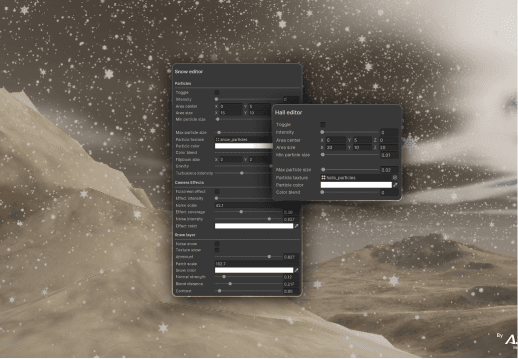
Clouds, weather, zones, and celestial elements can be adjusted separately while still working together as one complete sky system.
Create different weather conditions inside the same scene, with smooth transitions between biomes, regions, or gameplay areas.
Use volumetric clouds for depth and realism, 2D clouds for lighter performance, or combine both in one environment.
Place and animate planets, moons, stars, and satellites to create realistic night skies or more imaginative atmospheric scenes.
Success highlights
Easy Sky helps Unity developers create immersive, responsive environments with less setup time, supporting realistic sky rendering, cinematic atmosphere design, and scalable weather simulation workflows.
15+ pre-made weather profiles ready to use from day one
5 independent sky systems: clouds, weather, zones, 2D & celestials
100% Integration with Real-Time Weather PRO for live simulation accuracy
From product design to development & completion. We guarantee exceptional products.


Scalable, secure and streamlined solutions for your business success
For business inquiries:
hello@assist.ro
Our address:
1 Tipografiei Street 720043, Suceava, Romania
Frequently Asked Questions
1. Can you integrate AI into an existing software product?
Absolutely. Our team can assess your current system and recommend how artificial intelligence features, such as automation, recommendation engines, or predictive analytics, can be integrated effectively. Whether it's enhancing user experience or streamlining operations, we ensure AI is added where it delivers real value without disrupting your core functionality.
2. What types of AI projects has ASSIST Software delivered?
We’ve developed AI solutions across industries, from natural language processing in customer support platforms to computer vision in manufacturing and agriculture. Our expertise spans recommendation systems, intelligent automation, predictive analytics, and custom machine learning models tailored to specific business needs.
3. What is ASSIST Software's development process?
The Software Development Life Cycle (SDLC) we employ defines the stages for a software project. Our SDLC phases include planning, requirement gathering, product design, development, testing, deployment, and maintenance.
4. What software development methodology does ASSIST Software use?
ASSIST Software primarily leverages Agile principles for flexibility and adaptability. This means we break down projects into smaller, manageable sprints, allowing continuous feedback and iteration throughout the development cycle. We also incorporate elements from other methodologies to increase efficiency as needed. For example, we use Scrum for project roles and collaboration, and Kanban boards to see workflow and manage tasks. As per the Waterfall approach, we emphasize precise planning and documentation during the initial stages.
5. I'm considering a custom application. Should I focus on a desktop, mobile or web app?
We can offer software consultancy services to determine the type of software you need based on your specific requirements. Please explore what type of app development would suit your custom build product.
- A web application runs on a web browser and is accessible from any device with an internet connection. (e.g., online store, social media platform)
- Mobile app developers design applications mainly for smartphones and tablets, such as games and productivity tools. However, they can be extended to other devices, such as smartwatches.
- Desktop applications are installed directly on a computer (e.g., photo editing software, word processors).
- Enterprise software manages complex business functions within an organization (e.g., Customer Relationship Management (CRM), Enterprise Resource Planning (ERP)).
6. My software product is complex. Are you familiar with the Scaled Agile methodology?
We have been in the software engineering industry for 30 years. During this time, we have worked on bespoke software that needed creative thinking, innovation, and customized solutions.
Scaled Agile refers to frameworks and practices that help large organizations adopt Agile methodologies. Traditional Agile is designed for small, self-organizing teams. Scaled Agile addresses the challenges of implementing Agile across multiple teams working on complex projects.
SAFe provides a structured approach for aligning teams, coordinating work, and delivering value at scale. It focuses on collaboration, communication, and continuous delivery for optimal custom software development services.
7. How do I choose the best collaboration model with ASSIST Software?
We offer flexible models. Think about your project and see which model would be right for you.
- Dedicated Team: Ideal for complex, long-term projects requiring high continuity and collaboration.
- Team Augmentation: Perfect for short-term projects or existing teams needing additional expertise.
- Project-Based Model: Best for well-defined projects with clear deliverables and a fixed budget.
Contact us to discuss the advantages and disadvantages of each model.
1. Is ASSIST Software a reliable company for custom engineering?
Absolutely. Our partners have given us great recommendations and reviews, leading us to win The Manifest Award for Most Reviewed Software Developers. Further proof comes from our 97% employee retention rate and ongoing client partnerships for over 8 years.
2. Are the ASSIST Software Romanian software engineers certified?
Yes. 85% of our software programmers are certified.
At a company level, ASSIST Software is certified and recognized by industry players such as Microsoft, AWS, Google Cloud, Adobe, Drupal, Fujitsu, ISTQB, and others.
Our employee certifications are tremendously important as they reflect the shared commitment to long-term growth.
3. Why should I choose Romania for custom software development?
Romania has become a significant player in custom software development, attracting businesses worldwide. Romania boasts the highest number of certified IT specialists in Europe and ranks sixth globally, surpassing even the US in tech specialists per capita.
At ASSIST Software, what sets us apart is our team and our location: our engineers are certified, experienced, and flexible, while being in the +2 GMT time zone allows us to easily facilitate meetings with clients all over the world.
4. What team will work on my project, and where will it be located?
ASSIST Software's headquarters is in Romania, a prime country for software development outsourcing. Our 350+ software engineers speak English and have a deep passion for innovation.
We provide regular project updates through reports, meetings, and online dashboards. Generally, you'll have access to a dedicated project manager who will be your point of contact for any questions or concerns.
5. How much will my project cost me?
Our prices are competitive, and as per our working model, we guarantee you will be satisfied with the result. Frequent meetings, check-ins, and a great communication structure will ensure this outcome.
Project costs depend on various factors, including complexity, scope, required technologies, and team size. We'll gather detailed information about your project during the initial consultation to provide a customized quote and we guarantee that you will be able to see the benefits of bespoke software.
1. What technologies do you work with?
ASSIST Software tackles your projects with a robust tech stack. We build native and cross-platform mobile apps, craft user-friendly web experiences, and create stunning visuals.
Our wide-ranging expertise starts from Java, Python, and JavaScript frameworks to cutting-edge solutions like AR/VR, blockchain, and AI/ML. We also manage databases, leverage cloud platforms, and ensure flawless project execution. We're your one-stop shop for exceptional software development from concept to deployment. You can view our expertise for more details.
2. Are you experienced in AI/ML development?
Yes. We have extensive experience in data engineering and machine learning operations (MLOps). We can employ neural networks, computer vision, and AI models to benefit your ideas.
You can trust our long-term experience with big data, NLP, and sentiment analysis, as over the past three years, we led a European security project with 15 partners focused on detecting radicalization on social media and the dark web.
3. Do you have a research and development department and work on European Projects?
We know R&D is crucial for businesses to stay competitive and thrive in dynamic markets. Successful R&D efforts lead to developing exceptional products or services, improved efficiency and effectiveness in operations, and enhanced market positioning.
We have established solid partnerships with 160+ European research companies, universities, and research centers (e.g., Fraunhofer, TWI, University of Heidelberg, REWE Group, SINTEF, etc.) and have participated as technical partners in over 25 EU-funded projects.
4. Besides custom software solutions, what other services do you offer?
Design Thinking for Breakthrough Products:
We craft user experiences that resonate. Our design process is an immersive collaboration, starting with workshops to uncover your vision and user needs. We conduct market research, analyze the competition, and guide you toward cutting-edge solutions in accordance with your business requirements.
Digital Transformation to Reimagine Your Business:
Digital transformation is nothing less than a strategic shift. We empower you to become more agile and data-driven, optimizing core processes for the digital age.
Scale with Confidence as We Build for Growth:
We understand that business success and development mean new challenges. Our solutions are built to scale seamlessly, accommodating increasing user bases and data volumes without sacrificing performance or security.
5. As a company, does ASSIST have its own software products?
Yes, ASSIST Software teams have been involved in designing and developing innovative products that address community needs. One such example is the web and mobile platform Autisma. This therapy assistant enables continued learning for children diagnosed with autism spectrum disorder.
Our extensive knowledge of the Unity and Unreal engines has allowed us to develop two mobile games, Elly and the Ruby Atlas and Hooman Invaders, as well as various Unity Assets, such as the Real-Time Weather PRO and Easy Sky. These two Unity assets allow Unity developers to control the weather and sky in their projects.
1. Is ASSIST Software hiring right now?
We are always looking for great people to join our team, whether you're a senior software engineer or a new talent seeking an IT career. Please check our careers page and contact us. Our HR department will contact you as soon as possible.
2. Is ASSIST Software organizing internships?
Yes. Each year, we organize individual and group internships for students. Our long-term partnership with the Stefan cel Mare University of Suceava allows us to put together great events for students and help them get started in the industry.
3. What type of learning culture does ASSIST Software encourage?
Our focus on innovation comes from a 'can do' attitude and the continuous learning we encourage our colleagues to pursue. We frequently organize workshops, learning sessions, presentations, and masterclasses. All these events are free and open to our colleagues and aim to support their professional and personal development.
4. How does ASSIST Software focus on teamwork?
The key to stellar teamwork is the quality time we spend together. ASSIST employees and their families are frequently invited to participate in all activities. We encourage a healthy lifestyle by promoting and organizing hikes, bike riding sessions, marathons, volleyball, football and tennis matches, ping-pong championships, and many more.
We show our care for the environment through reforestation campaigns and forest cleaning activities.
We also have an English-speaking club, e-sports gaming nights, tech discussions, networking parties, and board game sessions.
5. How does ASSIST Software give back to the community?
Volunteering and charity are essential to us, which is why we founded the ASSIST Humanitarian Foundation. We genuinely care about our community and want to improve the future. We invest in IT equipment for schools and award excellent teachers. We also help hospitals and fire departments enter the 21st century.
We sponsor cultural events and deliver humanitarian aid to those in need. If you agree with our views, you can also donate.