How to leverage your automated testing framework using advanced techniques with Playwright TS (Part I)
Introduction
Whether you're a developer, a testing guru, or the person who magically makes all the bugs disappear (yes, we're talking about you, QA heroes), there is a sense of responsibility when it comes to ensuring your application works flawlessly. Even though it's like trying to explain to your cat that the keyboard is not its bed.
We don't like last-minute change requests. Especially if it's Friday evening, you're ready to kick back and relax, and your friends are waiting for you at the bar... "How am I going to test all of this?" you might ask yourself. If you're thinking about opening 3 different browsers and the 2 mobile devices you found in the drawer... you'd better not! Unless, of course, you've got a stash of energy drinks and no weekend plans, but that's not the case right now. That's where an automated testing framework saves the day (or night in this case 😉), where with a single click, you can run all these tests, ensuring everything works ✨ perfectly ✨ while you get all dressed up.
Do you remember when you sent the email with that typo, even though you've read it 10 times? I apologize if I made you think about it again just when you thought it was over. We're prone to errors, which is perfectly normal. The automated tests perform the same steps in the same way every… single… time. This consistency means you can catch those intermittent bugs that only show up when Mercury is retrograde.
In today's agile world, speed is everything. Faster feedback, quicker bug fixes, and more time for you to focus on what you do best (building awesome features) can all be achieved with the right automated testing framework.
Playwright is an automated testing framework that has rapidly gained popularity and adoption (Figure 1) among developers for its ability to manipulate and automate browsers (Chromium, Firefox, WebKit) using a single API.
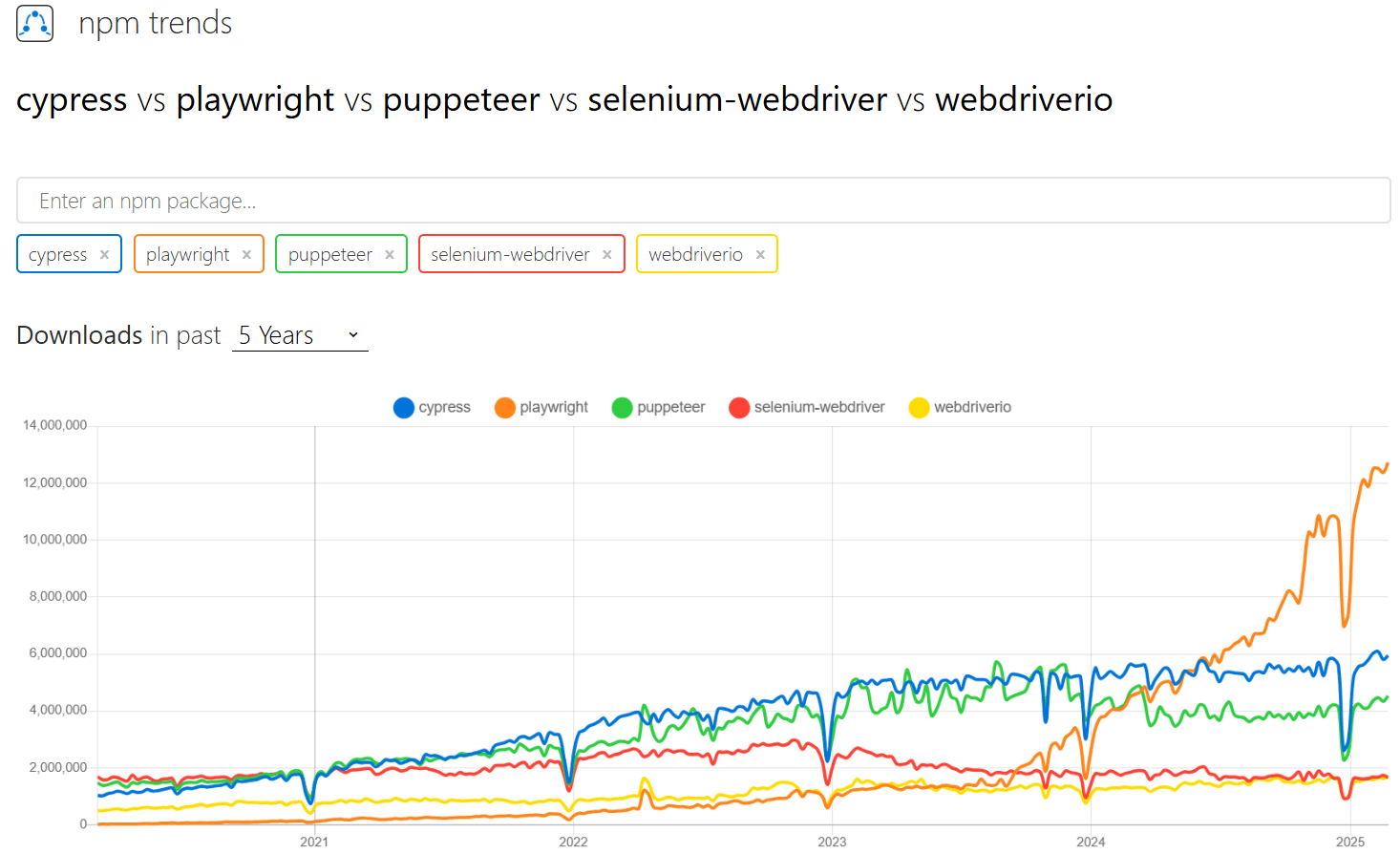
What if I told you that you can write your tests once and have them perform flawlessly across all mentioned browsers? It sounds like magic, right? The recent buzz in the tech community has spotlighted Playwright's impressive features, like auto-waiting, screenshot capturing, and even recording videos of your test runs. As a powerful automated testing framework, it simplifies the testing process and improves reliability.
Enough talking, let's not waste time. It's time to explore some of the mentioned features together.
Making testing easy
- Rich assertions
Traditional assertions are for the past. Instead of the simple true/false condition checks, these rich assertions provide more context and information about the state of your application, making it easier to diagnose issues by using clear and expressive statements. They are designed to simplify the testing process by providing a straightforward way to check the conditions without writing complex logic.
So, no more wrestling with your tests – there are built-in checks for visibility, text, attributes, and more, so you can be prepared for any scenario. Plus, if you use an automated testing framework, these assertions also wait for elements to reach the desired state before proceeding further, eliminating the need for arbitrary delays.
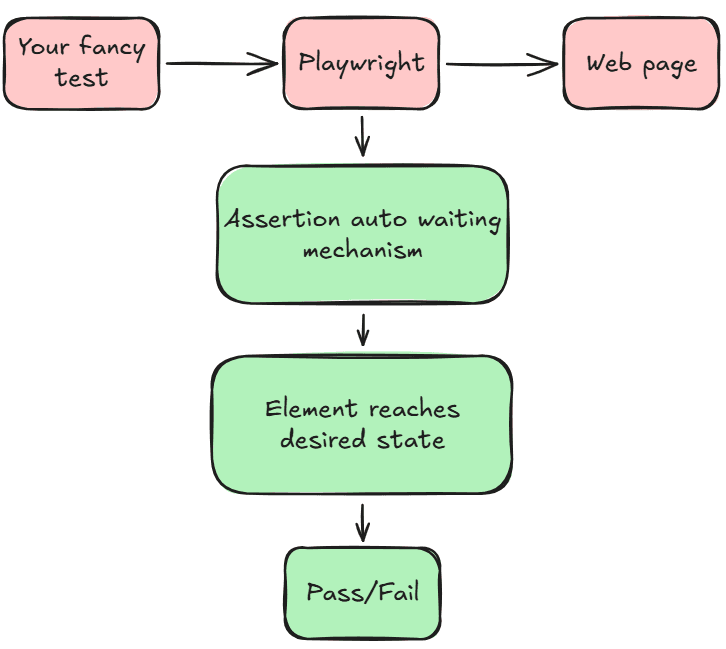
Let’s see some examples:
- Text check: verify that an element contains a specific text: await expect(locator).toHaveText()
- Visibility check: verify if an element is visible on the page: await expect(locator).toBeVisible()
- The page has a specific URL: await expect(page).toHaveURL()
- The response has an OK status: await expect(response).toBeOK()
test('Assertion tests', async ({ page }) => {
  await page.goto('https://example.com');

  // Verify that an element contains specific text.
  await expect(page.locator('h1')).toHaveText('Example Domain');

  // Verify if the redirect link is visible.
  await expect(page.locator('a')).toBeVisible();

  // Verify if the page has a specific title.
  await expect(page).toHaveTitle('Example Domain');
});
- Flaky tests – be gone!

Remember those tests that fail randomly, making you question your life choices? As I said previously, an automated testing framework like Playwright has the ability to auto-wait (Auto-waiting | Playwright), which ensures that the elements are ready before you interact with them. This reduces flakiness and gives you more reliable test results – so no more excuses of 'but it worked 5 minutes ago!'; now it will really work.
Let's take a look at the following example, where we have a test that asserts a specific message once we access a website.
test('might be flaky', async ({ page }) => {
  await page.goto('https://example.com/');

  // Assuming that the page will take longer to load than expected, the following assertion might be flaky.
  // Playwright doesn't recommend this approach.
  const text = await page.locator('h1').textContent();

  // Check if the text is correct.
  expect(text).toBe("Example Domain");
});
In this example, we navigate to the website, and then we make an assertion based on the text content of the 'h1' locator. Now, what if your network speed was really poor during that time? Or is there a load on the server? Clearly, the default timeout for an element check won't be enough, and your test will fail.
On the contrary, if there are no issues with your network speed or with the server, the test will pass. This is flakiness, in a nutshell: sometimes the tests will pass, and sometimes they will fail.
To make our mentioned test more reliable, we can replace the assertion with a Playwright assertion that will wait for the success message to appear.
test('is not flaky', async ({ page }) => {
  await page.goto('https://example.com/');

  // Use smart assertions to avoid flakiness.
  await expect(page.locator('h1')).toHaveText("Example Domain", {
    timeout: 10000
  });
});
The assertion will wait up to 10 seconds for the text to match, but even if the message appears sooner, the test will still pass.
- Cross-browser testing
Let’s face it – browsers can be a pain sometimes. What works in Chrome might throw a tantrum in Safari. With an automated testing framework like Playwright, you can write your tests once and run them across Chromium, Firefox, and WebKit.
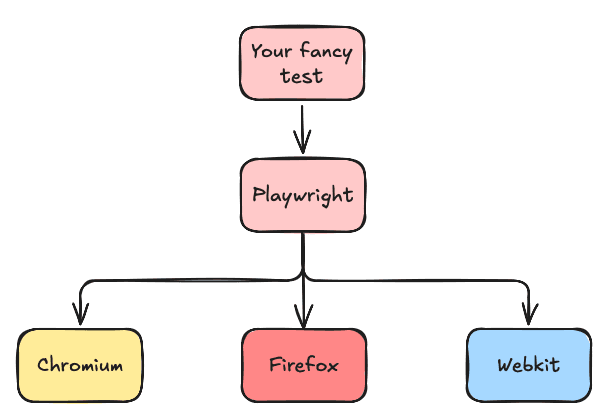
The ‘playwright.config.ts’ file specifies different browsers, and it can even emulate devices that we can use for testing. For example, we can configure the following projects:
import { defineConfig, devices } from '@playwright/test';

export default defineConfig({
  /* Configure projects for major browsers */
  projects: [
    {
      name: 'chromium',
      use: { ...devices['Desktop Chrome'] },
    },

    {
      name: 'firefox',
      use: { ...devices['Desktop Firefox'] },
    },

    {
      name: 'webkit',
      use: { ...devices['Desktop Safari'] },
    },
  ],
  timeout: 60000,
});
Now, let’s write a test:
// Use 'npx playwright test' and all the tests will run on multiple browsers.
test('Title is correct', async ({ page }) => {
  await page.goto('https://example.com/');

  // Check if the page has a specific title.
  await expect(page).toHaveTitle("Example Domain");
});
With this minimal setup, we already have cross-browser testing set in place. Once you run the above test, it will be executed across the configured projects (browsers).
- Visual/Non-visual regression checks
We've all pushed a change only to realize we've unintentionally broken some layouts. Those beautiful button styles have now mysteriously vanished. Playwright's screenshot capturing and video recording features can help you visually inspect your application's UI. You can catch these sneaky visual bugs by comparing screenshots of your application before and after changes.
Let's take an example:
test('Snapshot assertion', async ({ page }) => {
  await page.goto('https://example.com');

  // Compare the screenshot with a baseline image.
  // Note that on first run, the test will fail (since the reference images do not exist).
  await expect(page).toHaveScreenshot();
});
Aaand… that's it! That's all you need. On the first run of your test, Playwright will generate some reference screenshots, and the subsequent runs will compare them against the reference. You can also update the baseline image, which will be used as a reference. For more details, you can take a look at the official documentation (Visual comparisons | Playwright).
The geeky part is that you can also take detailed snapshots of your app's state, and here I'm referring to DOM structure, component states, and more. In addition to the visual appearance, you can ensure that the structure and data are correct, just like having an X-ray vision. These snapshots are text-based, which means that you can quickly spot differences and understand the changes without squinting at pixel-by-pixel image comparisons. They can easily be integrated with your version control system (such as Git).
There is a specific way that Playwright treats these snapshots: they are stored next to the test file in a separate directory ([test-file-name]-snapshots), all part of your automated testing framework setup.
For example (Visual comparisons | Playwright):
test('Snapshot assertion 2', async ({ page }) => {
  await page.goto('https://example.com');

  // Compare the text content inside the first paragraph with the text from inside the specified file.
  // Note that on first run, the test will fail (since the reference text doesn't exist).
  const textContent = await page.locator('p').first().textContent();
  expect(textContent).toMatchSnapshot('first_paragraph.txt');
});
In the above test, the text content present inside the first paragraph is compared to the text present inside the 'first_paragraph.txt' file. Pretty cool, no?
- API mocking
Let's say you're testing the product listing page of an e-commerce site. It relies on a real server to fetch product data. But what if the server decides to go on a coffee break? By mocking the network requests, you can control the data that your application receives, and you will not rely on the server's mood.
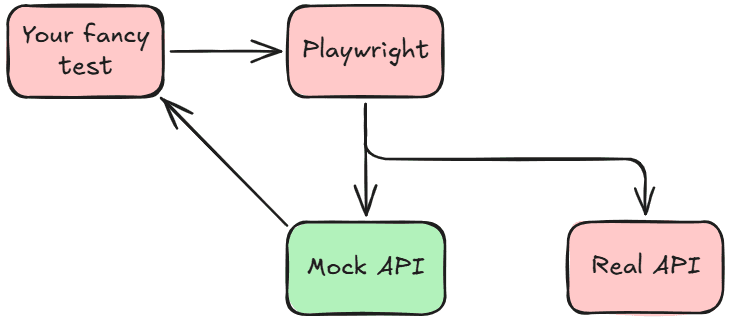
See this example where we intercept a request for some todos, and we modify the response:
test('Mocking network response', async ({ page }) => {
  // Mock data to be returned.
  const mockData = [{ id: 1, name: 'Mock Item' }];

  // Intercept the network request and respond with mock data.
  await page.route('https://jsonplaceholder.typicode.com/todos/1', route => {
    route.fulfill({
      contentType: 'application/json',
      body: JSON.stringify(mockData),
    });
  });

  // Navigate to the page that makes the network request.
  await page.goto('https://jsonplaceholder.typicode.com/');

  // Click on the button to see the response.
  await page.getByText('Run script').click();

  // Simple assert to check if the 'Mock Item' text is visible.
  await expect(page.getByText('Mock Item')).toBeVisible();
});
API mocking gives you the ability to control the data flow by eliminating the unpredictability of external servers. You hold the strings – whether you need to simulate a successful API call, test how your app handles errors, or even verify edge cases. This automated testing framework feature gives you even more authority over your tests.
I must mention that these mocks can be like those stunt doubles who don't capture the real actor's charm, which leads to some false confidence. They're perfect for early development or when your API is stuck in traffic on its way to the office. But please keep in mind that you still need the real stars for the final performance if you want to catch the integration issues.
Can Playwright be your new best friend?
Playwright is an automated testing framework that acts as your all-in-one toolkit – the vigilant guardian that ensures your web app looks and performs beautifully, regardless of where it's accessed from. You can catch visual glitches, control data flows, eliminate intermittent issues, and ensure a seamless experience across different browsers without breaking a sweat.
Deciding if this automated testing framework suits your needs is now up to you. We recommend starting small: dip your toes in the water before diving and automate a few critical test cases to get a feel for how Playwright works. As you become more comfortable, try Playwright's built-in features, such as auto-waiting and assertions, and take a shot at its advanced features (for example, network interception).
You can access our GitHub repository if you want to have a closer look at the examples that we provided: alexandru-ci-assist/playwright-tutorial: Introduction to Playwright with simple examples.
We've just scratched the surface of what an automated testing framework like Playwright can do. In the upcoming posts, we'll dive deeper into its world, exploring its advanced features and best practices and implementing comprehensive design patterns to help you get the most out of this tool, regardless of your experience. Stay tuned!