How AI Tools Accelerate Cinematic Creation in Unreal Engine 5.5
Frequently Asked Questions
Authors
In recent years, Artificial Intelligence (AI) has become an indispensable part of our daily workflows. Whether it’s generating a grocery list, writing code, designing characters, or producing high-quality 3D animations, AI is transforming how we create content across industries. In the world of real-time cinematic production, this shift is especially evident with the release of Unreal Engine 5.5.
Combining Unreal Engine 5.5 with powerful AI-driven tools, creators can build entire cinematic scenes faster than ever. In this article, I’ll walk you through a hands-on experiment: producing a proof-of-concept cinematic using a suite of AI tools—including ChatGPT, DALL·E, Rodin.AI, and Quixel Megascans (Fab), which is integrated into the Unreal Engine pipeline.
AI-assisted cinematic pipelines in Unreal Engine 5.5 are increasingly used in modern game development, virtual production, digital twins, simulation platforms, and immersive XR experiences.
The goal of this project was simple: create a cinematic quickly using AI, prioritizing speed and automation over polish. The focus was to demonstrate how AI accelerates content creation and streamlines traditional production bottlenecks in storytelling, design, animation, and editing.
Modern studios are increasingly seeking tools that accelerate full-cycle game development from concept to live ops while reducing production time for cinematic scenes, animation workflows, and environment creation.
AI-assisted cinematic creation refers to the use of machine learning tools and generative AI systems to automate or accelerate animation, rendering, scene composition, dialogue generation, asset creation, and visual storytelling workflows.
To showcase how artificial intelligence can accelerate creative production, this cinematic project explored how AI tools can support storytelling, character creation, 3D modeling, animation, and environment design - all within the powerful ecosystem of Unreal Engine 5.5.
Many developers and studios are actively seeking tools to integrate AI art into Unity and Unreal projects, especially for concept art generation, texture synthesis, procedural asset creation, NPC dialogue systems, and cinematic scene prototyping.
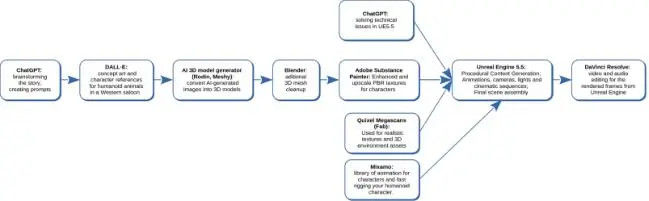
Here’s a breakdown of the tools used and their roles in the workflow:
a. ChatGPT
Used to brainstorm the story concept, generate scene prompts, and troubleshoot technical challenges in Unreal Engine 5.5. It was key in scripting logic, dialogue ideas, and project planning.
b. DALL·E
AI-generated concept art and detailed character references—especially humanoid animal designs tailored for a Western saloon environment. These visuals helped guide the 3D modeling phase.
c. Rodin.AI & Meshy (AI-Based 3D Model Generators)
These tools transformed 2D AI-generated images into usable 3D models, streamlining the asset creation process. This drastically reduced modeling time and enabled quick iterations.
d. Adobe Substance Painter
Refined and upscaled PBR textures for characters and props, ensuring realism and high-quality surface detail without manual texturing from scratch.
e. Quixel Megascans (now Fab)
Provided a vast library of realistic textures and environmental 3D assets, perfect for quickly assembling believable, cinematic-level backgrounds.
f. Epidemic Sound
Enabled the generation and licensing of AI-powered soundtracks and sound effects, enhancing the cinematic feel with minimal time investment.
g. Mixamo
Fast-tracked character animation and rigging. Mixamo’s pre-built motion libraries allowed seamless importing of animated humanoid characters into Unreal Engine.
h. Inside Unreal Engine 5.5
The core cinematic scene was developed using the following features of UE5.5:
- Procedural Content Generation (PCG): Automated asset placement for environmental elements like rocks, foliage, and roads. This feature significantly reduces manual-level design time.
- Cinematics System: Handled animations, camera movements, lighting setups, animations, and sequencing to bring scenes to life with visual storytelling.
Final Assembly: Integrated all assets and sequences into a cohesive cinematic project ready for rendering.
i. Post-production with DaVinci Resolve
After rendering the frames from Unreal Engine, the final edit was completed in DaVinci Resolve. This included video trimming, audio syncing, color correction, and export formatting for final delivery.
This AI-driven workflow showcases the future of real-time filmmaking and game cinematics, where creative vision meets automation and speed. Whether you're an indie creator or part of a large studio, integrating these AI tools with Unreal Engine 5.5 can unlock new levels of productivity and visual storytelling.
3.1 AI-Generated Story & Character Concepts
To begin the creative process, we used ChatGPT to develop a captivating AI-generated Western story set in a stylized desert environment. The narrative features Whiskers, a humanoid cat bounty hunter, drawn into a mystery surrounding a peculiar gramophone in a saloon.
As the plot unfolds, Whiskers uncovers that the eerie sounds from the gramophone are linked to a mischievous raccoon orchestrating a clever local scheme. This quirky and imaginative AI-written story sets the tone and guides the visual direction, character design, and animation style used throughout the cinematic production in Unreal Engine 5.5.
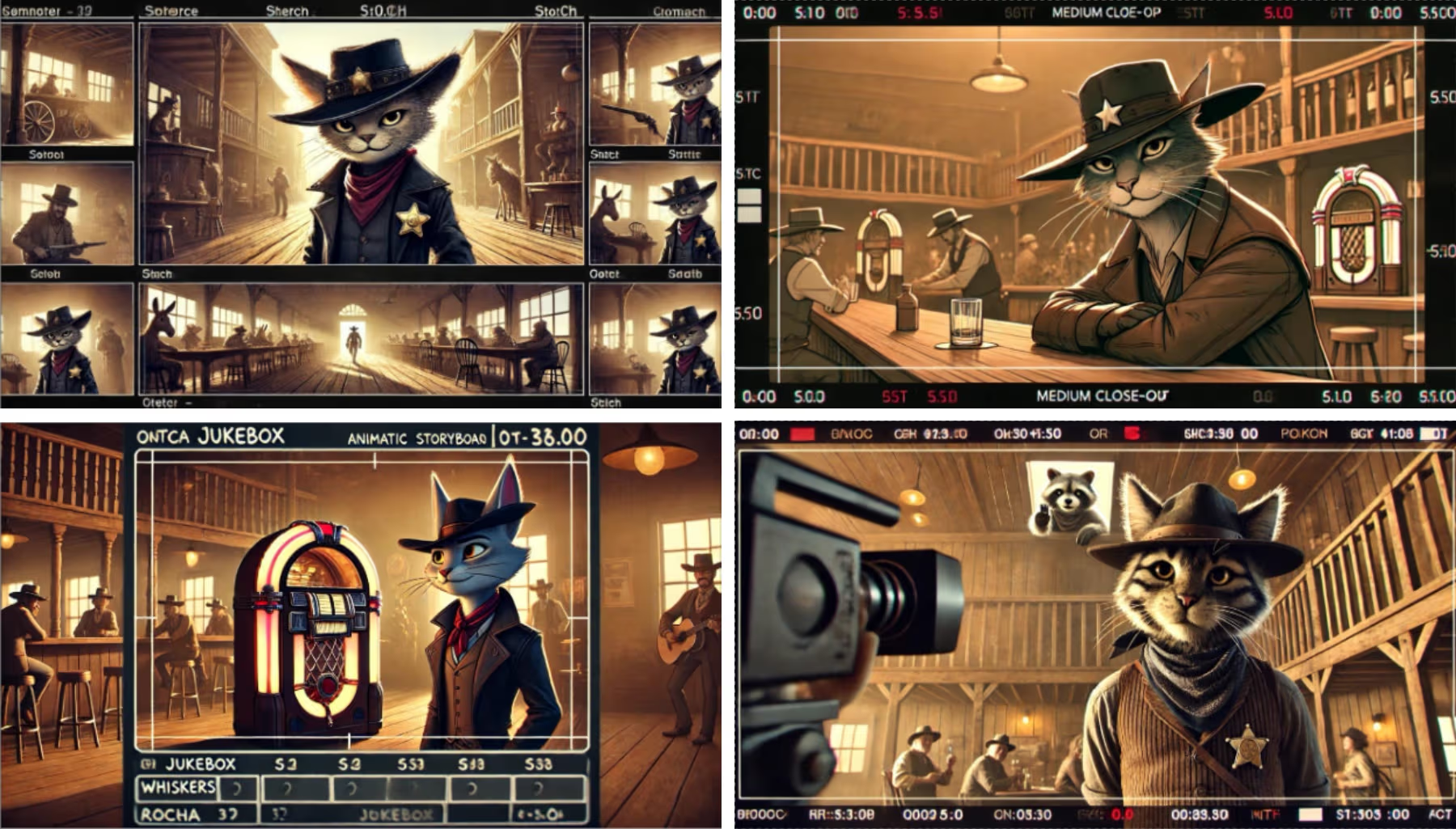
Example of the result from ChatGPT:
“Title: Whiskers and the "Haunted" Gramophone
Set in a dusty Western saloon, the story follows Whiskers, a humanoid animal bounty hunter—a cat with a knack for outwitting troublemakers. Whiskers arrives at the saloon on a slow day, looking for a quiet drink and a break from the heat. However, things take a strange turn when the gramophone in the corner starts playing by itself and speaking in riddles. The patrons believe the saloon is haunted, but Whiskers suspects there’s something more mischievous at play. Through clever observation and charm, Whiskers uncovers the truth about the “haunted” gramophone and leaves the saloon with an unexpected new companion. “
Once the basic plot was settled, we asked ChatGPT for a good prompt for DALL·E to generate concept art for the main characters:
- Whiskers (Humanoid Cat Bounty Hunter)
The prompt result for Whiskers was:
“Design a humanoid cat bounty hunter with a classic Western vibe. Whiskers is sleek and confident, with fur patterns resembling a tabby cat. They wear a dusty leather hat, a worn vest with a star-shaped badge, and a bandana tied loosely around their neck. Their belt holds a coiled lasso and a holster for a slingshot (for non-violent fun). Whiskers exudes charm and intelligence, with a slight mischievous glint in their eyes. Their movements are graceful, blending feline elegance with a gunslinger’s swagger. The overall tone should feel warm and light-hearted, fitting the dusty saloon and desert environment.”

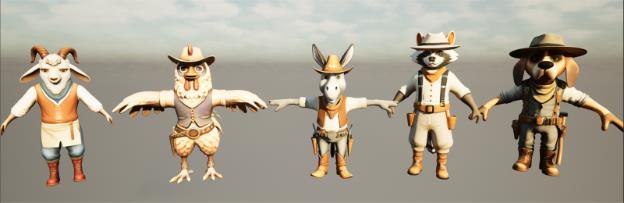
- Ricky the Ruckus (The Racoon)
- A Grumpy Goat Bartender
- A Humanoid Chicken Saloon Patron
- A Donkey Gambler
- An Old Prospector (Dog Character)
DALL·E created full-body reference images for each of them. They were refined by changing the prompt so the character's pose is in T-pose or A-pose for easier 3D rigging.
After finalizing the 2D concepts, we used AI-powered 3D modeling tools like Rodin.AI to convert images into game-ready 3D assets for Unreal Engine 5.5.
Rodin allowed us to generate detailed meshes with custom settings like T/A Pose and symmetry. We also used text prompts to create matching PBR textures. The tool supports various export formats—. FBX for models and PBR maps worked best in our pipeline.
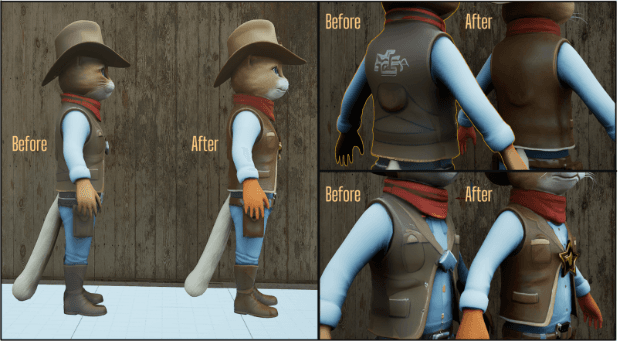
While some models required minor cleanup (extra vertices, mesh holes, or texture artifacts in overlapping geometry), the time saved using AI far outweighed the small fixes. This approach helped us quickly produce high-quality 3D characters and props for cinematic use.
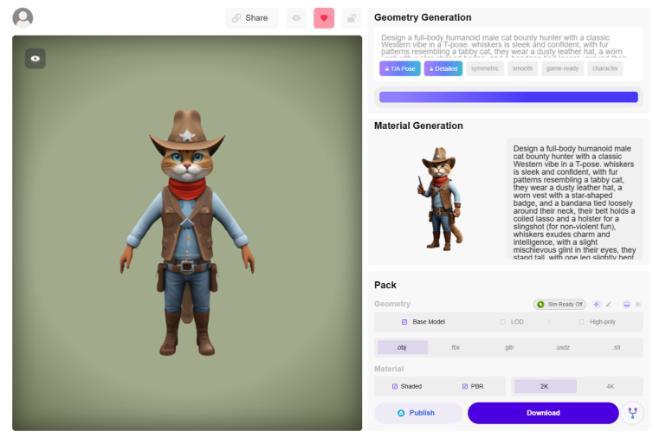
We used Blender for mesh cleanup and Substance Painter to enhance and fix PBR textures, addressing missing or broken materials from the AI-generated models.
This streamlined workflow helped us create high-quality 3D character models in a fraction of the time—no manual sculpting or retopology needed.
On the left is an example of the difference between the result from Rodin.AI and the result after fixing some mesh issues and the textures:
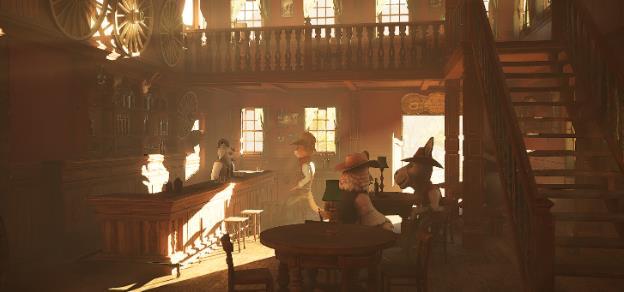
We used Fab (Quixel Megascans) assets like the Saloon Interior Pack, Desert Western Cliffs, and Old West Foliage to build the Western saloon and desert environment. We sculpted the terrain in Unreal Engine 5.5 to add natural variation, then populated the scene with these optimized props for a cinematic-ready look.
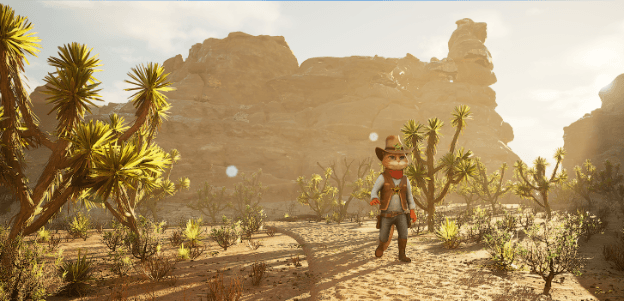
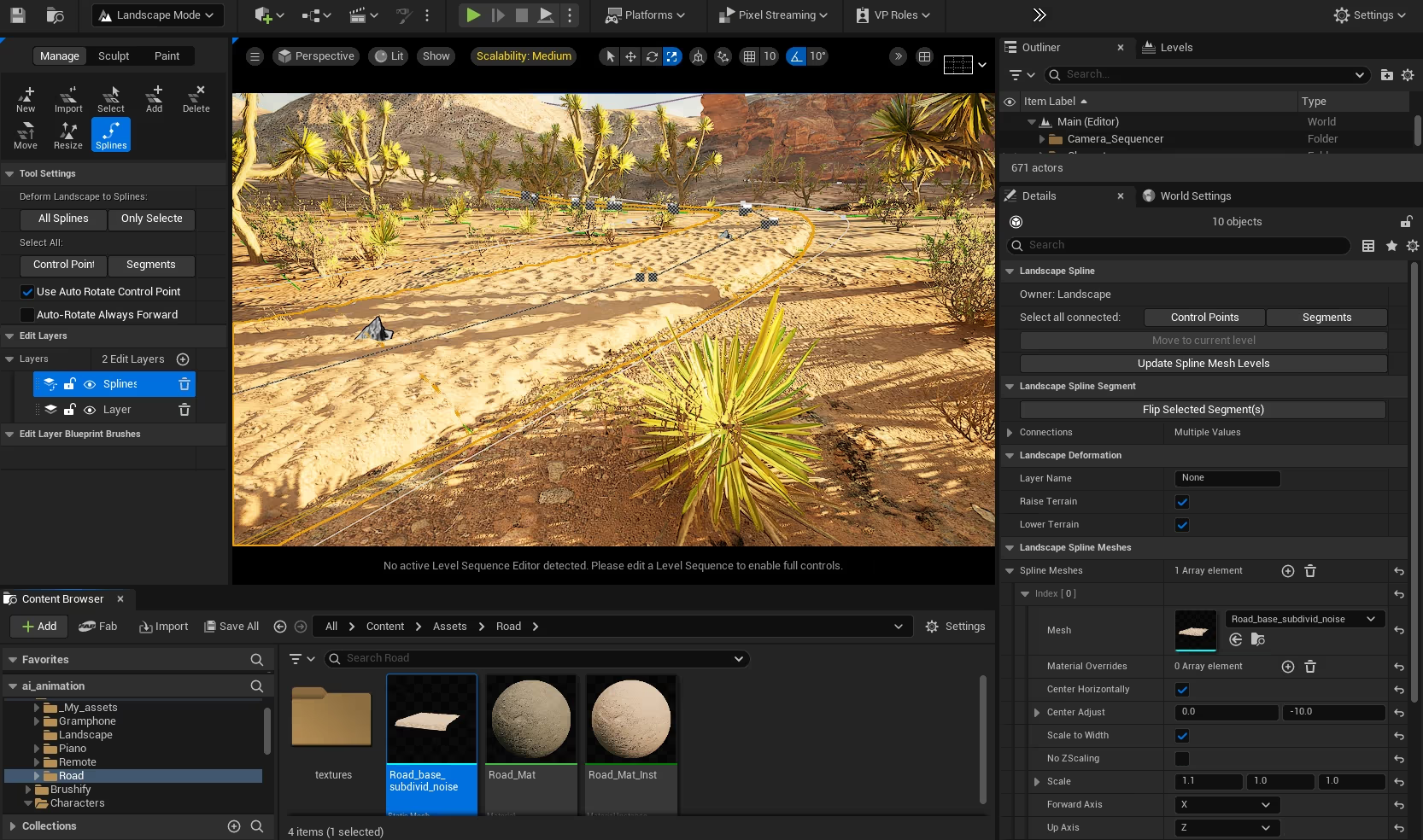
The road was created as a landscape spline on a dedicated terrain layer in Unreal Engine 5.5, allowing it to dynamically modify the surrounding environment. Any terrain adjustments impacted the spline—and vice versa—ensuring seamless integration. The road mesh was modeled in Blender, using profile extrusion and a displacement modifier driven by a noise texture for a natural, rugged look.
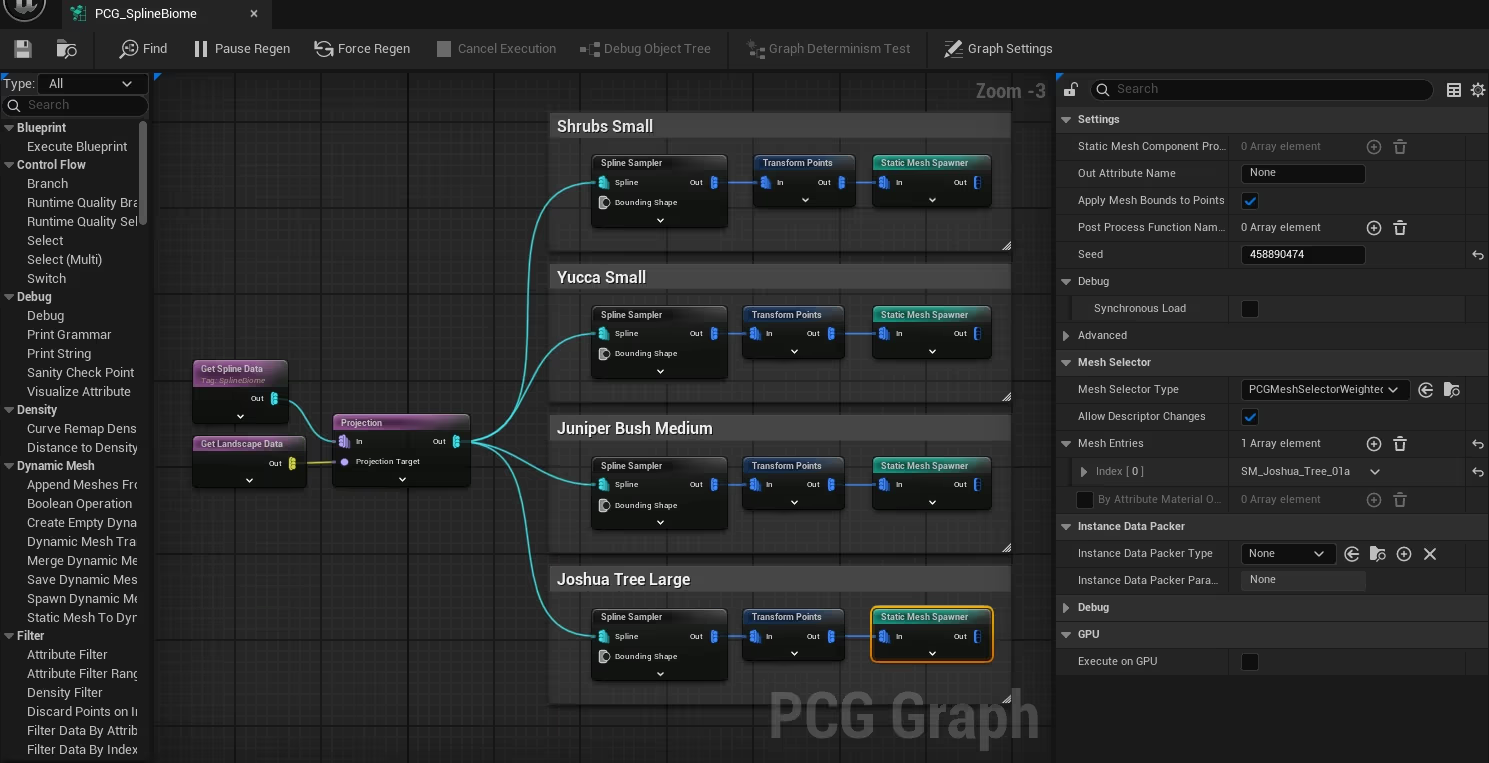
Vegetation was added using spline-based PCG (Procedural Content Generation) in Unreal Engine 5.5, allowing precise control and fast scattering across the environment. We could fine-tune placement, scale, and distribution by separating vegetation types into different PCG graphs. The procedural setup also made iterative changes quick and efficient.
To speed up the rigging process, we used Mixamo’s auto-rigging tool, which worked surprisingly well, even for our humanoid animal characters. Once rigged, we imported the models into Unreal Engine 5.5, preserving the skeleton data.
Using the One Click Rig plugin, we quickly generated control handles to make animation in the Sequencer easier. A custom tail control was added via Control Rig for precise posing and animation.
Minor skinning issues were corrected using weight painting adjustments in Unreal’s Skeleton Editor to ensure smoother deformations during animation.
The final cinematic was assembled using the Unreal Engine 5.5 Sequencer, a powerful real-time animation and storytelling tool. Scalability settings helped optimize playback performance during editing, ensuring a smoother workflow.
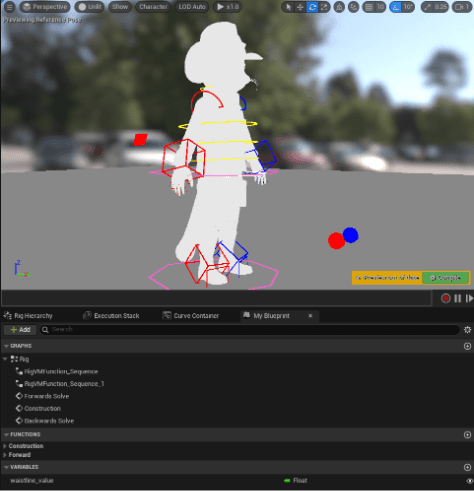
We used Control Rig as an additive layer for animation adjustments on top of Mixamo animations, allowing for quick iteration and fine-tuning. Understanding your rig setup before animation is crucial to avoid issues later in the pipeline.
To blend character animations, we used transition overlaps, while any position mismatches were fixed using the “Match Bone” function—seamlessly aligning bone positions between animations. For dynamic movement, walking characters were animated along a Spline Actor, enabling smooth, path-based motion.
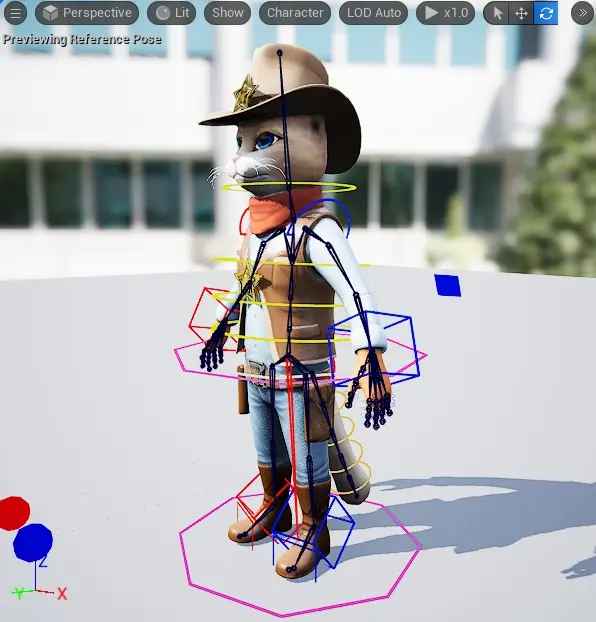
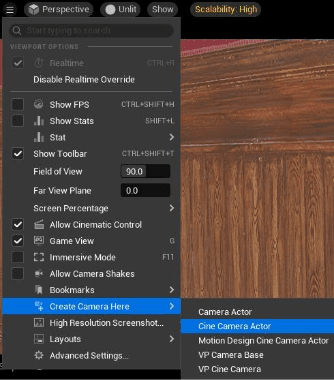
A powerful feature in Unreal Engine 5.5 is the “Add Camera Here” command, which lets you quickly place new cameras that align with the current viewport angle. Additionally, the piloting tool allows for direct camera animation within the viewport, providing an intuitive and efficient way to seamlessly navigate and animate your scenes.
Similar to real-world lighting techniques, we implemented compensation lights in the saloon and adjusted exposure based on location. To efficiently manage multiple objects, we used groups in Unreal Engine’s Sequencer, organizing them by type.
Another approach involved nested sub-sequences, allowing for a more structured and flexible workflow.
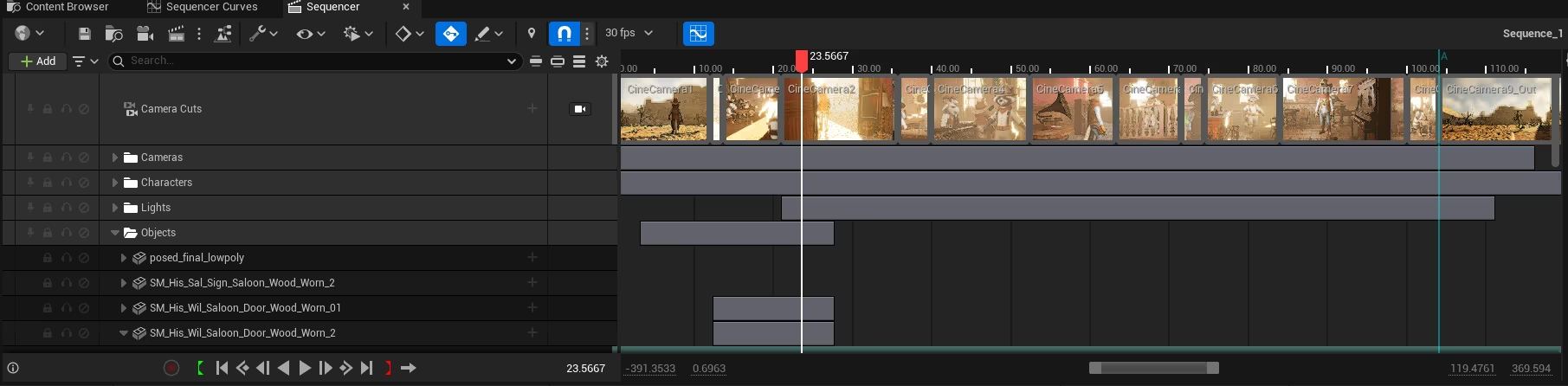
In Unreal Engine 5.5, we used a variety of camera moves and lenses within the Sequencer to achieve the desired visual effects. Wide lenses were employed to establish the location, while telephoto lenses were used for close-up shots focusing on the characters. For the "Haunted Gramophone" scene, a dolly zoom effect was applied to intensify the scene's emotional impact.
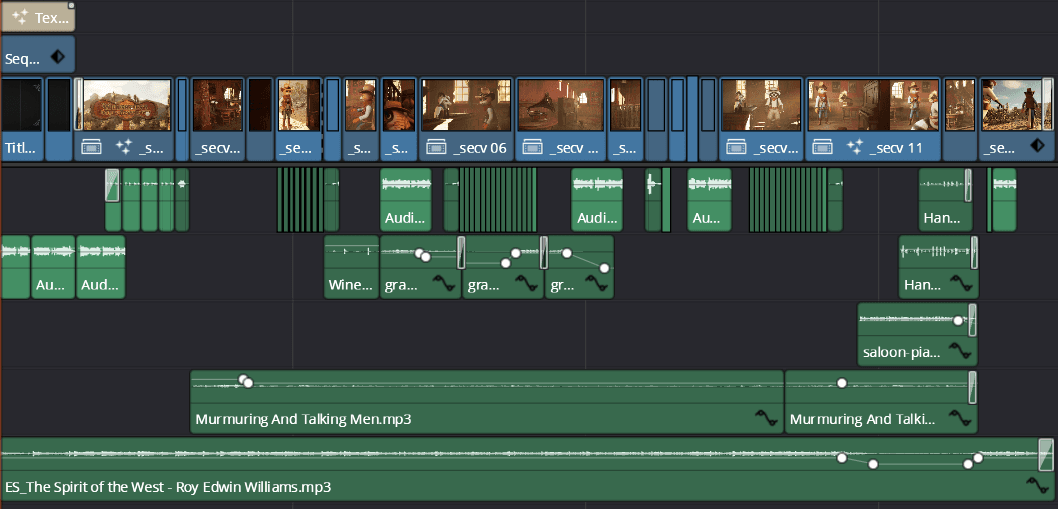
The final video and audio editing were done in DaVinci Resolve, using frames rendered through the Movie Render Queue from the Unreal Sequencer window.
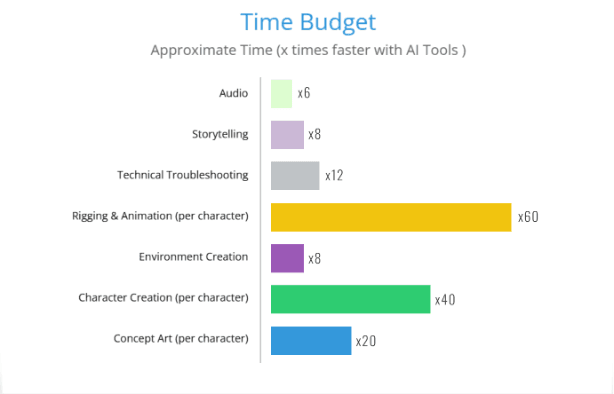
4.1 What worked well?
- AI Integration streamlined the entire workflow, from story creation to asset generation.
- Unreal Engine 5.5’s PCG tools made environment asset generation incredibly fast.
- AI-assisted animation tools enabled quick character movements without the need for manual rigging.
- AI-based 3D modeling tools dramatically reduced character creation time.
4.2 What didn’t work well?
- AI-generated character models still require manual cleanup in Blender for refinement.
- Some AI-generated textures needed additional tweaks in Substance Painter to ensure quality.
- AI animations needed extra polish to match specific cinematic requirements.
- Weight painting adjustments were necessary to achieve smooth bone bending.
This proof-of-concept cinematic demonstrated that AI tools can significantly speed up production in Unreal Engine 5.5. While AI cannot entirely replace manual work, it effectively removes many repetitive tasks, enabling creators to focus on storytelling and directing.
Should AI be used for previsualization, concepting, and prototyping? Absolutely!
Should AI be used for high-quality final cinematic production? Probably not without manual refinement.
AI is an invaluable tool and will only improve if you’re looking to accelerate your cinematic workflow.
Frequently Asked Questions
What AI tools work best with Unreal Engine 5.5?
Popular AI tools used alongside Unreal Engine 5.5 include ChatGPT, DALL·E, Meshy, Rodin.AI, NVIDIA Omniverse, Convai, Inworld AI, Adobe Firefly, and Cascadeur. These tools help accelerate storytelling, 3D asset creation, animation, and cinematic workflows.
Can Unreal Engine 5.5 be used for VR and AR development?
Yes. Unreal Engine 5.5 supports development and deployment across PCs, mobile devices, VR headsets, AR platforms, and immersive XR experiences.
How is AI changing cinematic creation in game development?
AI accelerates content generation, automates repetitive production tasks, improves rapid prototyping, and allows smaller teams to create cinematic-quality experiences faster than traditional workflows.
Is Unreal Engine suitable for digital twin projects?
Yes. Unreal Engine is increasingly used alongside technologies such as NVIDIA Omniverse for digital twins, industrial simulations, robotics visualization, and real-time synthetic environments.
Authors
Renard Tamas is a Technical Artist and 3D Artist who combines artistic creativity with strong technical expertise in game production and real-time content creation. With more than 9 years of experience in 2D and 3D art, he specializes in character design, environments, game assets, UI elements, and animations for interactive applications and games. His skill set spans Blender, Photoshop, Illustrator, and Unity workflows, with hands-on experience in sculpting, low-poly modeling, PBR texturing, hand-painted textures, rigging, and animation.
By blending visual quality with technical optimization, he creates immersive digital experiences that are both visually compelling and production-ready.
Mihai Vitega is an Unreal Engine Developer and 3D Generalist who combines technical expertise with a strong creative background in real-time environments, animation, and digital visualization. Specializing in Unreal Engine, architectural visualization, and cinematic rendering, he combines skills in lighting, photography, and visual storytelling to create immersive, visually polished experiences.
With experience spanning 3D graphics, videography, and interactive content production, he focuses on delivering high-quality visuals that balance artistic detail with real-time performance optimization.
As one of the first companies in Europe to hold ISO/IEC 42001:2023 certification for Artificial Intelligence Management Systems, ASSIST Software operates under a formally recognized governance framework for AI development. The standard covers the full lifecycle of AI systems, from planning and development through deployment, monitoring, and continuous improvement, providing clients with concrete assurance that AI initiatives are managed responsibly.