Game Requirements

My task was to create a 3d weapon selection screen for the mobile game Zelgor. It looked as a simple task, but once we analyzed to game flow especially between the GUI systems we realized that a more complex and natural interface was necessary. The response was to create a 3d command room (inspired from the 60s) that will host a set of functionalities and create a smooth and natural transition between different options in the scene.

The structure of the room would consist of 4 core systems: equipment, game, command and exit. For each of these elements I created a list of 3d elements and the functionality of the environment.
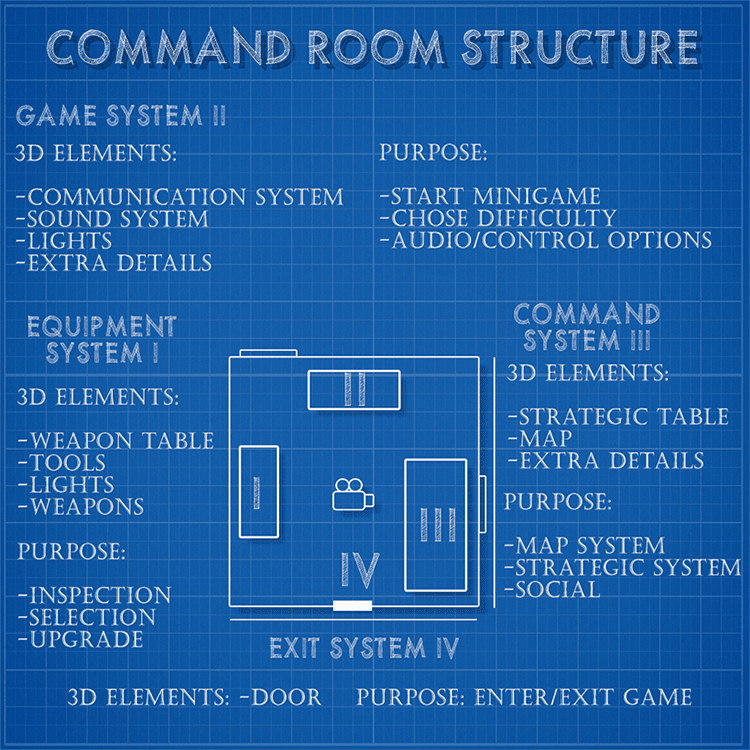
Game environment core structure

Once the “blueprint” of the room was done, the next step consisted of researching actual pictures/footage and analyzing the elements that would be necessary for a command room. The main focus was to create an environment that would be functional and give a sense of shelter for the player.

High poly modeling in 3D Studio Max

In this presentation I'm not going in depths about hard surface modeling techniques in 3d studio, because in most part this topic was discussed in the article “The Pipeline Behind modeling, animating and integrating the Flak 88 AA Gun in Zelgor”. Still there are some key rules that will make your modeling process easier and more streamlined:
 

First rule is to create as many subcomponents as you need for each model in the scene. In other words, don’t try to use one mesh to create every detail because in most cases it will backfire badly.


A good modeling workflow is to use as much as you can NURBS modeling. NURBS, which stands for Non-Uniform Rational B-Splines, is an industry standard for designing and modeling surfaces. It is particularly suitable for modeling surfaces with complex curves with relative small amounts of polygons that can be tweaked on the fly.
 

Last but not least, try to reuse the high poly models for generating the low poly versions. For this you need to plan “smart” the high poly versions. Use swift loops, chamfer to create a base version that with turbo or nurbs smooth modifiers will generate the high poly elements. After that you clone the model, delete the extra loops and you have a low poly version ready to go.
 

The final step in the high poly modeling process is to add a diffuse color code for every subcomponent of the models. These colors will represent the materials used for texturing the low poly elements (wood, metal, glass, plastic and so on). This and the normal map will be the textures extracted from the high poly model to the low poly version.
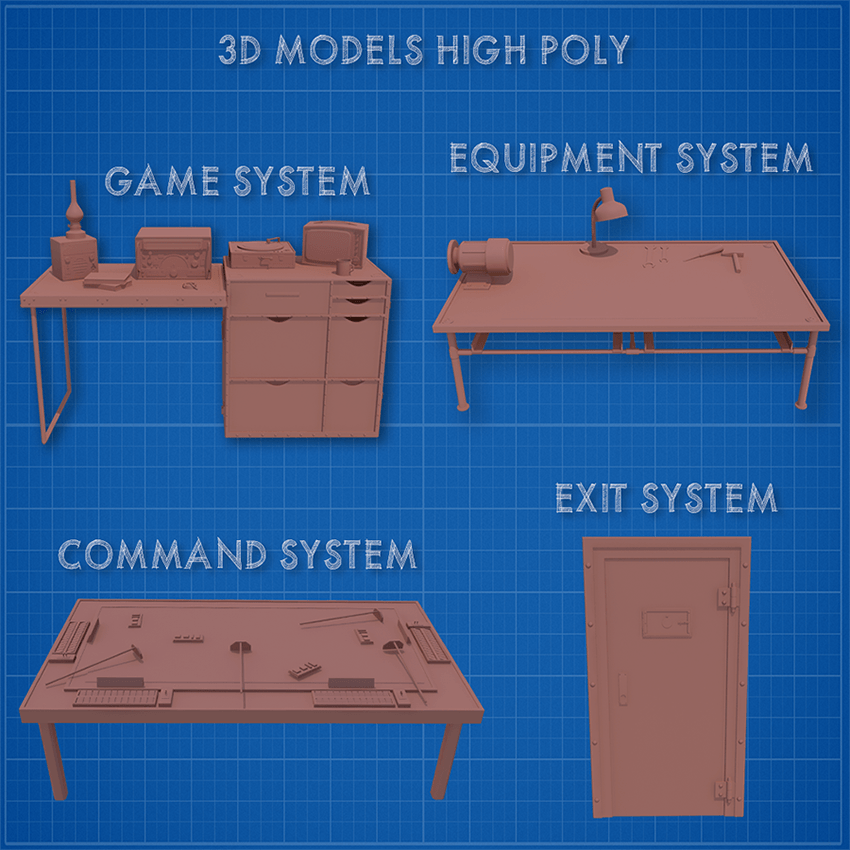
 

3d-poly
Low poly modeling and basic map extraction

The final step in the modeling process is to create the low poly version of the scene and extract for each element two maps: the color diffuse and most important the normal map. Of course, for this, each 3d object needs to have his UV unwrap done so that we can project the 3d details to a texture map.
 

Baking a RGB map from your high poly model is a huge time saver allowing you to quickly extract selection masks that you can use as the basis of your texture.
 

The normal mapping or "Dot3 bump mapping" is a technique used for faking lighting of bumps and dents and used to add more details to 3d models without using more polygons. Normal maps are commonly stored as regular RGB images where the RGB components correspond to the X, Y, and Z coordinates, respectively, of the surface normal.
 

To calculate the Lambertian (diffuse) lighting of a surface, the unit vector from the shading point to the light source is dotted with the unit vector normal to that surface, and the result is the intensity of the light on that surface. By using a 3-channel bitmap textured across the model, more detailed normal vector information can be encoded. This technique in correlation with advanced lighting system can create very realistic 3d effects and details on low poly models.
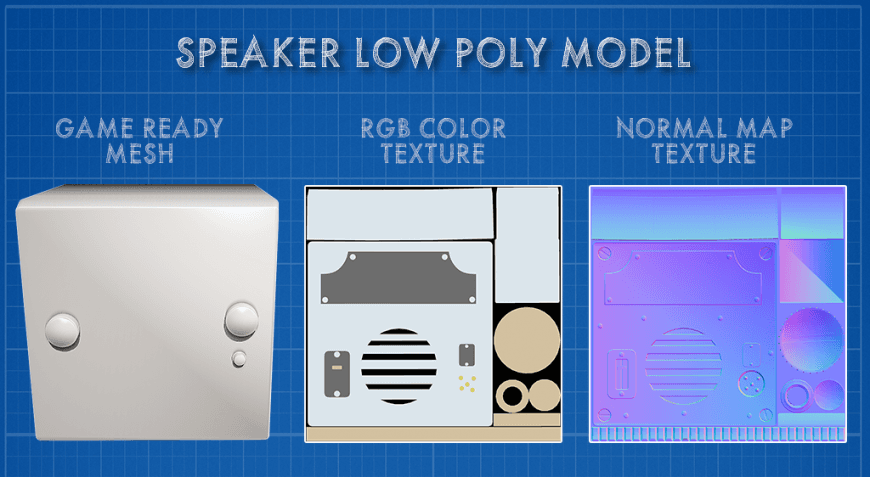
 

basic-map-extraction
Texturing for physics based on shaders

Physics based shaders require a set of textures that work together to achieve a realistic material that reacts natural to the light sources of the game engine. For this will need to create the following texture maps: diffuse, normal specular and gloss.
 

The diffuse map is your basic color texture; here you define the color information for your materials.
 

The normal map provides per pixel lighting/shading information. In our case, we generated the normal map from our high detail model, but at the same time, we can add further details with the help of Nvidia Normal Map, Crazybump,Bitmap2Material and other programs or plug-ins.
 

The specular map is used to define both the color and the strength of the specular reflection highlights.
 

The gloss map is used to define the “sharpness” or “roughness” of the specular reflection highlight, essentially how wide or narrow the highlight is. Darker gloss values are used to define matte materials, while brighter gloss values are used to define glossy materials.
 

When working on texturing is important to generate all the textures at the same time. You can use Photoshop, Mudbox and many other 2d/3d texturing applications to help you create the maps you need. It’s equally important to understand the physical properties of the materials in real life and how they react to each other and the lighting conditions.
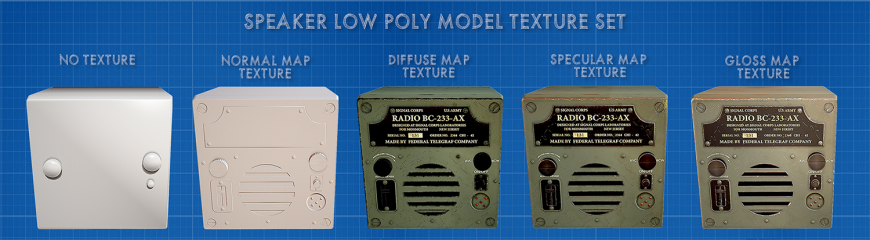

speaker low poly model texture set

For the speaker we used 3 materials each with its unique physical characteristics: painted metal, rough plastic and brass.

Painted metal is a complex material composed of 4 layers. The first was the actual glossy paint (military green and, in our case, black ). The second layer was the scratches, marks, small dust particles, color desaturation that give it a worn-out aspect. The third layer focuses on deep edge corrosion and scratches that are more visible and show the actual metal underneath. The final layer was the information texts on the speaker.

The rough plastic is a relative easy to do material because it’s basically just flat colors. For the diffuse map I chose a dark grey color. I added a dull reflection and some scratches. The normal map did all the heavy lifting for the plastic components adding all the small details to the buttons.

Brass is all about diffuse and specular color. It’s one of those materials that are difficult to represent without full color specular maps (usually it’s recommended to have full color specular map, opposite to the gloss map that is only a black and white texture). You can add some patina effect for aged effect and use average values for the gloss texture.

Another family of materials that require a full spectrum specular is the lacquered and/or painted wood. The material can be easily seen in action on the old TV model in the scene. The diffuse map was a wood texture. The colored specular had the wood grain integrated because I wanted the reflection to come from the wood profile, not just from the glossy coating. As in the case of the speaker, some scratches, edge wear has been added to create a more natural feeling to the model.
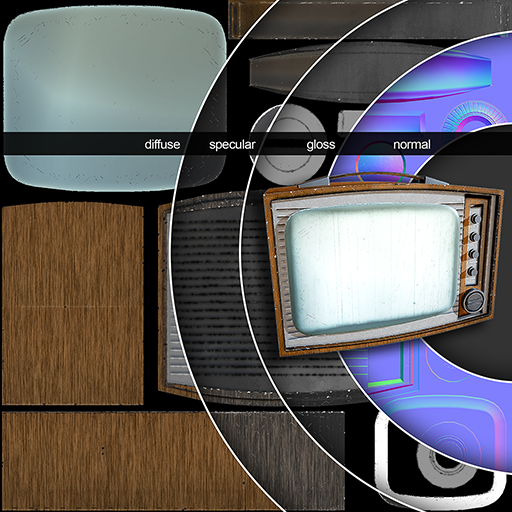
spectrum specular

Unity 3D Scene: Global Illumination and Image Based Lighting

In the unity 4.x version there is no physical based shader out of the box. In the upcoming unity 5.0 this problem will be resolved with the “standard” shader that will help create physical based materials easily in any targeted platform.

For now we used third party plugins and shaders to create the materials. These materials have an extra texture slot for the specular map and the ability to change the values of the specular intensity and sharpness.

The gloss map can be added in the transparency channel of the specular map (just create a new channel in Photoshop and copy the gloss map there). The only downside is that for this to work you need the actual 32 bits image otherwise the map will not load. Due to this fact, for mobile gaming (all the textures are compressed) the gloss map cannot be added but can be simulated in some degree.

All this complex materials would have no impact without the help of Image Based Lighting. The lighting is done from HDR images that allow a high degree of realism.

HDR images can represent a greater range of luminance levels found in real-world scenes, from direct sunlight to faint nebula. It is often achieved by capturing and then combining different exposures of the same subject matter. In other words, when you render a 3d model the background of the scene is what gives the mood, tone and contrast of all the elements (fig7.0). The specular and gloss values of the image bellow have been overhauled to better visualize the different ambient lighting scenarios.
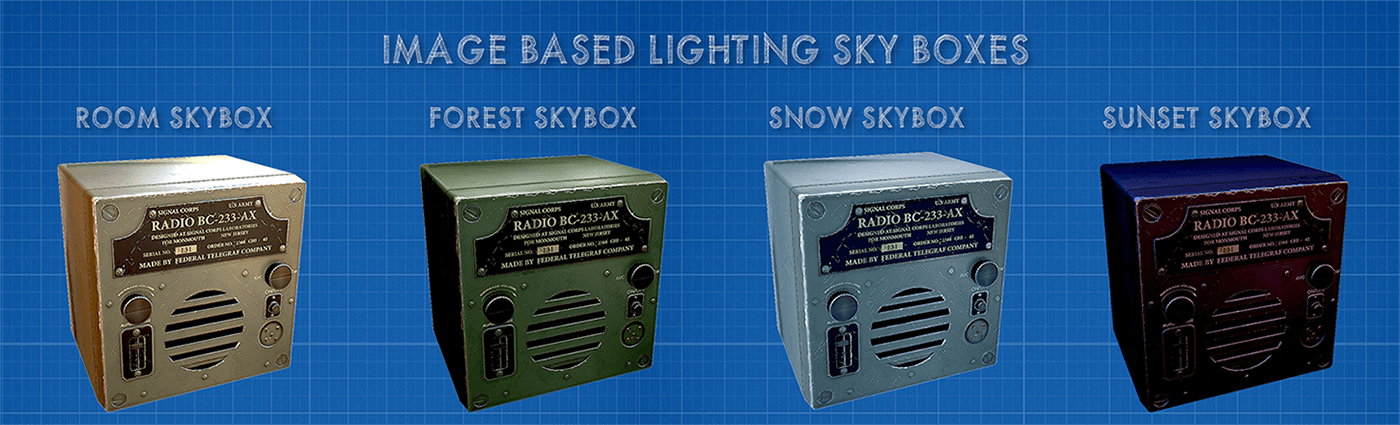
Ibl system with different skyboxes

Once the IBL System has been added ( skyboxes), the next step is to add the light system from Unity. Image based lighting must be treated as ambient lighting; you still need directional lights to your scene for the sun and other light sources (spot, point, area) to light and cast shadows.

The final step is to bake the shadows into directional lightmaps, because real-time shadows are one of the most heavy resource eating elements on any platform. The directional lightmaps work exactly like the classic single Lightmap with one major addition: Static objects exhibit full lighting and specular / bump effects from all the light sources (Auto / Realtime-only / Bake-only).

Web Export for tech demo

To better visualize all these elements, I exported the weapon selection screen­ to the web platform so that you can walk around the scene and inspect each element freely. The controls for moving around are the following:

W-move forward, S-move backward, A-move left D-move right.

The mouse is used for camera rotation and pressing left mouse gives you a zoom in/out mode to better view the 3d models.

The roof of the room is hidden so you can see the skybox, and with the “R” key you can rotate the sky to see how it affects the specular and glossiness maps of the materials. The day/night illumination system can be activated by pressing the “+” and “– “ keys on your keyboard.

For this demo all parameters of the physical properties have been raised up to better see the visual differences. Note that this export is the raw project from iOS without any tweaks/optimizations for web development and that you need to install the unity web plug-in on your browser to view the content.

Conclusions

I hope this article helps new 3d designers to better understand how to achieve and, more important, what are the main steps behind creating game ready environment assets.

At the same time, physic based rendering is an exciting trend in real time rendering. The term is about many things (global illumination, image based lighting, physic based shaders, energy conservation and so on), but what makes it different from its predecessors is the more detailed and intuitive reasoning behind the behavior of light and surfaces.

The 3d designer must change the way he produces textures for its 3d assets because lots of the lighting information will be baked in the textures. To create realism, you may also want to adjust to what real materials are like, what specular ranges make sense, how different lighting conditions affect your models and so on. At the same time, due to the growing number of textures used per object, you may need to downgrade the resolution of the textures and optimize the unwrapping to squeeze as much detail as you can in each texture.

On the other side, all the real time global illumination data require a lot of computing power, so in most cases the developer must understand the hardware limitations and try to achieve a balance between baked and real-time global illuminations. Unity 5 comes with a new set of light baking features, new lighting workflow and a new “unified” shader system, that will help the developer to achieve his desired results within this new system.

This means that both, the developer and the artist, must understand the motivations behind these changes and how old means of producing digital art are changed in this new process.

→ If you want to find out more about the author of the article click play on the below video.
Share on:

I have read and understood the ASSIST Software website's Terms of Use and Privacy Policy.

Want to stay on top of everything?

Get updates on industry developments and the software solutions we can now create for a smooth digital transformation.

Frequently Asked Questions

1. Can you integrate AI into an existing software product?

Absolutely. Our team can assess your current system and recommend how artificial intelligence features, such as automation, recommendation engines, or predictive analytics, can be integrated effectively. Whether it's enhancing user experience or streamlining operations, we ensure AI is added where it delivers real value without disrupting your core functionality.

2. What types of AI projects has ASSIST Software delivered?

We’ve developed AI solutions across industries, from natural language processing in customer support platforms to computer vision in manufacturing and agriculture. Our expertise spans recommendation systems, intelligent automation, predictive analytics, and custom machine learning models tailored to specific business needs.

3. What is ASSIST Software's development process?  

The Software Development Life Cycle (SDLC) we employ defines the stages for a software project. Our SDLC phases include planning, requirement gathering, product design, development, testing, deployment, and maintenance.

4. What software development methodology does ASSIST Software use?  

ASSIST Software primarily leverages Agile principles for flexibility and adaptability. This means we break down projects into smaller, manageable sprints, allowing continuous feedback and iteration throughout the development cycle. We also incorporate elements from other methodologies to increase efficiency as needed. For example, we use Scrum for project roles and collaboration, and Kanban boards to see workflow and manage tasks. As per the Waterfall approach, we emphasize precise planning and documentation during the initial stages.

5. I'm considering a custom application. Should I focus on a desktop, mobile or web app?  

We can offer software consultancy services to determine the type of software you need based on your specific requirements. Please explore what type of app development would suit your custom build product.   

  • A web application runs on a web browser and is accessible from any device with an internet connection. (e.g., online store, social media platform)   
  • Mobile app developers design applications mainly for smartphones and tablets, such as games and productivity tools. However, they can be extended to other devices, such as smartwatches.    
  • Desktop applications are installed directly on a computer (e.g., photo editing software, word processors).   
  • Enterprise software manages complex business functions within an organization (e.g., Customer Relationship Management (CRM), Enterprise Resource Planning (ERP)).

6. My software product is complex. Are you familiar with the Scaled Agile methodology?

We have been in the software engineering industry for 30 years. During this time, we have worked on bespoke software that needed creative thinking, innovation, and customized solutions. 

Scaled Agile refers to frameworks and practices that help large organizations adopt Agile methodologies. Traditional Agile is designed for small, self-organizing teams. Scaled Agile addresses the challenges of implementing Agile across multiple teams working on complex projects.  

SAFe provides a structured approach for aligning teams, coordinating work, and delivering value at scale. It focuses on collaboration, communication, and continuous delivery for optimal custom software development services. 

7. How do I choose the best collaboration model with ASSIST Software?  

We offer flexible models. Think about your project and see which model would be right for you.   

  • Dedicated Team: Ideal for complex, long-term projects requiring high continuity and collaboration.   
  • Team Augmentation: Perfect for short-term projects or existing teams needing additional expertise.   
  • Project-Based Model: Best for well-defined projects with clear deliverables and a fixed budget.   

Contact us to discuss the advantages and disadvantages of each model. 

1. Is ASSIST Software a reliable company for custom engineering?

Absolutely. Our partners have given us great recommendations and reviews, leading us to win The Manifest Award for Most Reviewed Software Developers. Further proof comes from our 97% employee retention rate and ongoing client partnerships for over 8 years.  

2. Are the ASSIST Software Romanian software engineers certified?

Yes. 85% of our software programmers are certified.  

At a company level, ASSIST Software is certified and recognized by industry players such as Microsoft, AWS, Google Cloud, Adobe, Drupal, Fujitsu, ISTQB, and others.  

Our employee certifications are tremendously important as they reflect the shared commitment to long-term growth.

3. Why should I choose Romania for custom software development? 

Romania has become a significant player in custom software development, attracting businesses worldwide. Romania boasts the highest number of certified IT specialists in Europe and ranks sixth globally, surpassing even the US in tech specialists per capita.  

At ASSIST Software, what sets us apart is our team and our location: our engineers are certified, experienced, and flexible, while being in the +2 GMT time zone allows us to easily facilitate meetings with clients all over the world.

4. What team will work on my project, and where will it be located?

ASSIST Software's headquarters is in Romania, a prime country for software development outsourcing. Our 350+ software engineers speak English and have a deep passion for innovation.  

We provide regular project updates through reports, meetings, and online dashboards. Generally, you'll have access to a dedicated project manager who will be your point of contact for any questions or concerns.  

5. How much will my project cost me?

Our prices are competitive, and as per our working model, we guarantee you will be satisfied with the result. Frequent meetings, check-ins, and a great communication structure will ensure this outcome.   

Project costs depend on various factors, including complexity, scope, required technologies, and team size. We'll gather detailed information about your project during the initial consultation to provide a customized quote and we guarantee that you will be able to see the benefits of bespoke software.  

1. What technologies do you work with?

ASSIST Software tackles your projects with a robust tech stack. We build native and cross-platform mobile apps, craft user-friendly web experiences, and create stunning visuals. 

Our wide-ranging expertise starts from Java, Python, and JavaScript frameworks to cutting-edge solutions like AR/VR, blockchain, and AI/ML. We also manage databases, leverage cloud platforms, and ensure flawless project execution. We're your one-stop shop for exceptional software development from concept to deployment. You can view our expertise for more details.   

2. Are you experienced in AI/ML development?

Yes. We have extensive experience in data engineering and machine learning operations (MLOps). We can employ neural networks, computer vision, and AI models to benefit your ideas.   

You can trust our long-term experience with big data, NLP, and sentiment analysis, as over the past three years, we led a European security project with 15 partners focused on detecting radicalization on social media and the dark web.

3. Do you have a research and development department and work on European Projects?

We know R&D is crucial for businesses to stay competitive and thrive in dynamic markets. Successful R&D efforts lead to developing exceptional products or services, improved efficiency and effectiveness in operations, and enhanced market positioning.   

We have established solid partnerships with 160+ European research companies, universities, and research centers (e.g., Fraunhofer, TWI, University of Heidelberg, REWE Group, SINTEF, etc.) and have participated as technical partners in over 25 EU-funded projects.  

4. Besides custom software solutions, what other services do you offer?

  • Design Thinking for Breakthrough Products:  

    We craft user experiences that resonate. Our design process is an immersive collaboration, starting with workshops to uncover your vision and user needs. We conduct market research, analyze the competition, and guide you toward cutting-edge solutions in accordance with your business requirements.  

  • Digital Transformation to Reimagine Your Business:

    Digital transformation is nothing less than a strategic shift. We empower you to become more agile and data-driven, optimizing core processes for the digital age.  

  • Scale with Confidence as We Build for Growth:  

    We understand that business success and development mean new challenges. Our solutions are built to scale seamlessly, accommodating increasing user bases and data volumes without sacrificing performance or security.  

5. As a company, does ASSIST have its own software products?

Yes, ASSIST Software teams have been involved in designing and developing innovative products that address community needs. One such example is the web and mobile platform Autisma. This therapy assistant enables continued learning for children diagnosed with autism spectrum disorder.   

Our extensive knowledge of the Unity and Unreal engines has allowed us to develop two mobile games, Elly and the Ruby Atlas and Hooman Invaders, as well as various Unity Assets, such as the Real-Time Weather PRO and Easy Sky. These two Unity assets allow Unity developers to control the weather and sky in their projects.   

1. Is ASSIST Software hiring right now?

We are always looking for great people to join our team, whether you're a senior software engineer or a new talent seeking an IT career. Please check our careers page and contact us. Our HR department will contact you as soon as possible.   

2. Is ASSIST Software organizing internships?

Yes. Each year, we organize individual and group internships for students. Our long-term partnership with the Stefan cel Mare University of Suceava allows us to put together great events for students and help them get started in the industry. 

3. What type of learning culture does ASSIST Software encourage?

Our focus on innovation comes from a 'can do' attitude and the continuous learning we encourage our colleagues to pursue. We frequently organize workshops, learning sessions, presentations, and masterclasses. All these events are free and open to our colleagues and aim to support their professional and personal development. 

4. How does ASSIST Software focus on teamwork?

The key to stellar teamwork is the quality time we spend together. ASSIST employees and their families are frequently invited to participate in all activities. We encourage a healthy lifestyle by promoting and organizing hikes, bike riding sessions, marathons, volleyball, football and tennis matches, ping-pong championships, and many more.   

We show our care for the environment through reforestation campaigns and forest cleaning activities.   

We also have an English-speaking club, e-sports gaming nights, tech discussions, networking parties, and board game sessions.   

5. How does ASSIST Software give back to the community?

Volunteering and charity are essential to us, which is why we founded the ASSIST Humanitarian Foundation. We genuinely care about our community and want to improve the future. We invest in IT equipment for schools and award excellent teachers. We also help hospitals and fire departments enter the 21st century.   

We sponsor cultural events and deliver humanitarian aid to those in need. If you agree with our views, you can also donate.   

ASSIST Software Team Members