Architecting Secure AI Features in Mobile Apps: Streaming, Proxies, and Fallbacks
Adding an LLM feature to a mobile app looks like a single API call. In production, it becomes an architecture problem: secrets, unreliable networks, long-running responses, app lifecycle, cost, and abuse all show up at once.
This article walks through the architecture we recommend for AI features in iOS and Android apps. It covers where the API keys live, how to stream responses, what to do when a response is cut off halfway, how to keep costs under control, and how the app behaves offline. The examples use Swift and Kotlin, but the patterns apply equally to Flutter and React Native.
The reference architecture
The core decision is a thin client and a smart backend. The mobile app never calls an LLM provider directly; it talks to a backend proxy you own, and the proxy talks to the providers.
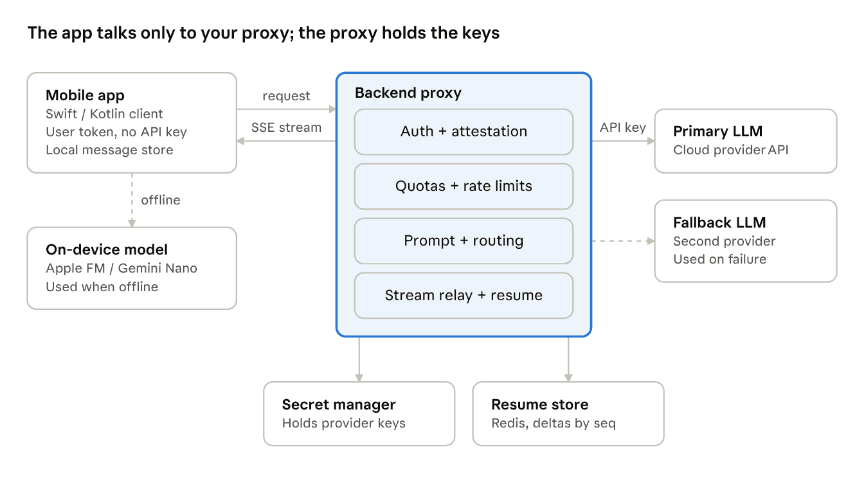
The app only holds a user token and the local message history. Everything that can change or can be abused lives on the proxy: authentication, quotas, prompts, model choice, and the stream relay that lets interrupted answers resume. Dashed lines are the fallback paths covered later in the article.
This split also maps well to team ownership: mobile developers own the streaming UI and local state, and backend developers own the proxy, with neither depending on a specific LLM vendor's SDK.
API keys never ship in the app
Anything inside an IPA or APK can be extracted. Obfuscation, splitting the key into pieces, or storing it in the Keychain after the first launch only slows an attacker down. Tools like jadx, strings, or a proxy such as mitmproxy recover a provider key in minutes, and a leaked key means someone else spends your budget.
The rule is simple: the app authenticates the user, and the backend authenticates to the LLM provider.
- The user signs in with your normal auth (OAuth/OIDC, Firebase Auth, Cognito, your own identity service).
- The app sends requests to your proxy using a short-lived access token (JWT, valid for 5–15 minutes).
- The proxy validates the token, applies quotas, and calls the provider using the key read from a secret manager (AWS Secrets Manager, GCP Secret Manager, Azure Key Vault).
- The provider key never leaves the server and can be rotated without an app release.
Two extra layers are worth adding for public apps:
- App attestation with Apple App Attest / DeviceCheck and Google Play Integrity. The proxy rejects requests that do not come from a genuine build of your app on a real device.
- Anonymous users still get a server-issued token tied to a device or install ID, so they can be rate-limited like everyone else.
A practical bonus: because the prompt lives on the server, you can change the system prompt, the model, or even the provider without waiting for App Store review.
Streaming responses to the device
A full LLM answer can take 5–30 seconds. Waiting for all of it behind a spinner feels broken; showing tokens as they arrive feels fast, even when the total time is the same. Streaming is the default for any conversational feature.
| Option | When to use it | Mobile trade-offs |
| Server-Sent Events (SSE) | One request, one streamed answer (most chat and summarisation features) | Plain HTTP, works through proxies and CDNs, easy to retry; one-way only |
| WebSockets | Two-way, real-time sessions (voice, collaborative agents, server-pushed events) | Persistent connection to manage across backgrounding and network changes |
| Chunked JSON / NDJSON | Structured partial results (lists, cards) | Same transport as SSE, you define the framing |
Most LLM providers already stream over SSE, so the simplest proxy forwards the provider stream to the app, translating it into your own event format along the way. Keep that format small and provider-neutral, for example:
Android (Kotlin, OkHttp + Flow):
Both snippets cancel the HTTP request when the UI stops collecting, so leaving the screen stops the generation and its cost. URLSession's timeoutIntervalForRequest and OkHttp's readTimeout measure idle time between bytes, not total duration, so the real risk is waiting for the first token on long prompts: raise them to 60–120 s for streaming calls only. In the UI, batch updates (for example, every 50 ms) instead of re-rendering on every token, especially with Markdown rendering in SwiftUI or Compose.
Handling partial responses
On mobile, a stream that stops halfway is normal, not an edge case. The user switches to another app, the phone switches from Wi-Fi to 4G, and the elevator door closes. Design for it explicitly.
Model the message as a state machine, not a string. Each assistant message is one of streaming, complete, interrupted, or failed, plus the text received so far and the last seq. The UI renders each state differently: a cursor while streaming, a "Continue" or "Retry" action when interrupted, a clear error when failed.
Let the server finish the work. The most robust pattern decouples generation from delivery:
- The proxy starts the generation and writes every delta to a short-lived store (Redis with a TTL of a few minutes works well) under the message id.
- It streams the same deltas to the app as long as the connection is alive.
- If the connection drops, generation continues on the server.
- When the app comes back, it reconnects via GET /messages/{id}/stream?after={lastSeq} and receives only what it missed, or the full result if the generation has already finished.
SSE has a standard mechanism for this: each event carries an id:, and a reconnecting client sends the last one back in the Last-Event-ID header. A browser's EventSource does this automatically; with URLSession or OkHttp you set the header yourself, but the server logic is the same. That is one more reason to prefer SSE over WebSockets for request/response features.
Respect the platform lifecycle. iOS suspends a backgrounded app within seconds, and Android may kill the process. Do not try to keep the stream alive in the background. Persist the partial message locally (Core Data / SwiftData, Room) as soon as you move to the background, and resume from the server on return. If the result must reach the user while the app is closed (for example, a long report), let the server finish and send a push notification.
Decide what "partial" means for structured output. Half a chat answer is still readable. Half a JSON object is not. For structured results, either stream a format that is valid at every step (one JSON object per line), or show a skeleton and only commit the result on done.
Make retries idempotent. Send a client-generated requestId with every request. If the app retries after a timeout, the proxy recognizes it and reattaches to the existing generation instead of starting (and billing) a second one.
Rate limiting and cost control
Every AI request costs real money, and a mobile app has thousands of clients you do not control. Rate limiting has to happen in two directions: limiting your users, and staying within your provider's limits.
Limit users at the proxy, by tokens, not only by requests. A request that sends a 50-page document costs far more than "hi". Track usage per user in input and output tokens, using the usage numbers the provider returns at the end of each stream.
| Layer | What it protects | Typical implementation |
| Per-user burst limit | Abuse, runaway loops in the client | Token bucket in Redis, e.g. 10 requests per minute |
| Per-user daily/monthly quota | Budget; maps to subscription tiers | Token counter per user per period, checked before each call |
| Request size limit | Single huge or expensive prompts | Cap input length and max_tokens on the server |
| Global budget alarm | Bugs and attacks you did not foresee | Provider spend alerts plus a kill switch flag |
Handle provider limits gracefully. Providers return HTTP 429 Too Many Requests errors or overload errors when you exceed their limits. The proxy should retry with exponential backoff and jitter (for example, 1 s, 2 s, 4 s, capped at 3 attempts), honor any retry-after header, and only then return a clear error to the app. Queue non-interactive work (summaries, tagging, embeddings) instead of competing with live chat for the same capacity.
Tell the app what happened. Return distinct error codes (quota_exceeded, rate_limited, provider_unavailable) with a retryAfter value. The app can then show "You've used today's AI credits; they reset at midnight" instead of a generic failure, and disable the send button rather than letting the user hammer it.
Reduce cost before you limit. Route simple tasks to a smaller, cheaper model and reserve the large model for hard ones. Use prompt caching for long, repeated system prompts. Cache identical answers (FAQ-style questions) at the proxy. Cap conversation history by summarising older turns instead of resending everything.
Offline and fallback
A cloud LLM is unavailable more often than you think: no signal, a provider outage, a user over quota. Decide upfront what the feature does in each case, so it degrades gracefully rather than breaks.
Think of it as a fallback chain, tried in order:
- Primary cloud model through the proxy.
- Secondary provider or smaller model, switched on the server when the primary fails or is overloaded. The app never knows; this is another benefit of the proxy.
- On-device model for tasks it can handle. Apple's Foundation Models framework (iOS 26+, iPhone 15 Pro or newer with Apple Intelligence enabled) and Gemini Nano on Android (ML Kit GenAI APIs on AICore: summarisation, proofreading, rewriting and image description, plus a general Prompt API, mostly still in beta) handle short text tasks with no network and no per-request cost. Check availability at runtime (SystemLanguageModel.default.availability on iOS), because many devices still lack them. On Android, Gemini Nano inference only runs while the app is in the foreground.
- Cached or precomputed results: previous answers stored locally, or content generated on the server ahead of time (daily summaries, recommendations).
- Non-AI degraded mode: a regular search instead of a semantic one, a template instead of a generated reply, or a clear "available when you're back online" state.
A few rules make this work in practice:
- Hide the routing behind one interface in the app, for example, an AiService with CloudAiService and OnDeviceAiService implementations, selected by connectivity, device capability, and task type.
- Queue what can wait. If the user asks for something that requires the cloud while offline, store the request (via WorkManager on Android or a background task on iOS) and deliver the result with a notification when it completes.
- Be honest in the UI. On-device models are smaller and less capable. Label the result when it comes from a lighter model, or restrict the on-device path to tasks where the quality is good enough.
- Test the failure paths. Use airplane mode, Network Link Conditioner on iOS and network throttling in the Android emulator, and add a server flag that forces the proxy to fail, so QA can check every step of the chain.
Checklist before you ship
☐ No provider API key in the app binary, config files, or CI-built artifacts
☐ All AI calls go through your backend proxy with short-lived user tokens
☐ App Attest / Play Integrity checked on the proxy for public apps
☐ Responses stream over SSE, with a provider-neutral event format and sequence numbers
☐ Messages are modelled as states (streaming, complete, interrupted, failed) and persisted locally
☐ Interrupted generations can be resumed from the server; retries are idempotent
☐ Per-user token quotas, request size caps and a global budget alarm are in place
☐ Provider 429s are retried with backoff on the server and mapped to clear error codes in the app
☐ A fallback chain is defined and tested: secondary model, on-device, cache, non-AI mode
☐ Failure paths are covered in QA with throttled networks and forced proxy errors
None of these items is specific to one LLM provider, and that is the point. The model will change, probably several times during the life of your app. A thin client, a smart proxy, and a planned fallback chain let you change it without rewriting the app or waiting for a store release.
Sources
- HTML Standard: Server-sent events (WHATWG): event id: field and the Last-Event-ID header on reconnection
- Establishing your app's integrity (Apple Developer): App Attest
- Overview of the Play Integrity API (Android Developers)
- URLSessionConfiguration Quick Guide (Use Your Loaf): request vs. resource timeouts
- OkHttpClient API reference (OkHttp 5.x): read and call timeouts
- Detecting available Apple Foundation Models (Apple Developer): supported devices and availability checks
- What's new in AI & machine learning (Apple Developer): Foundation Models framework
- Overview of the ML Kit GenAI APIs (Google for Developers): Gemini Nano APIs, release status, devices and foreground-only inference